Samsung Galaxy Z Trifold Impression!
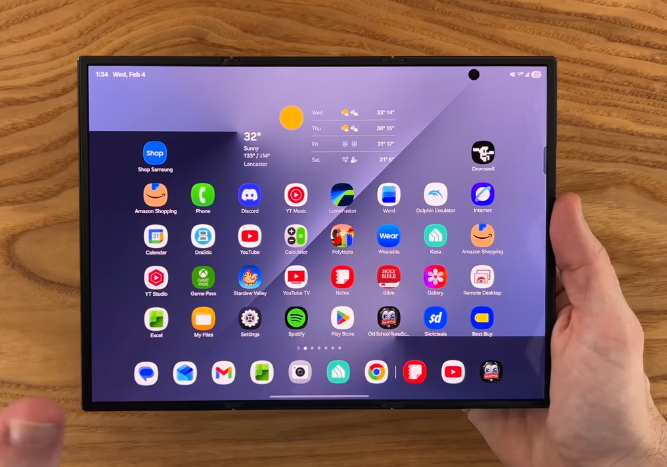
Table of Contents
Inro, Specs:

Hello everyone, we’re going to be doing an unboxing. We’re going to give our first impressions on the Samsung Galaxy Z Trifold. This phone was released a couple of days ago. We were fortunate enough to get one before it sold out pretty much immediately. If it happens to be available, you can check it out for yourself.
Comes in just one configuration, we have the crafted black colour with 512 gigs of storage and 16 gigabytes of RAM.
Unboxing:
Let’s see what we get in the box. On top, we have an accessories box here. Our first look at the tri-fold, super excited to check this out. Still cold from shipping here in the winter. We have a 45-watt charger included in the box, so this does support faster charging, really hyped about that actually.
We have a case included in here, also nice to see. So we have Samsung’s carbon case here that was also on the Fold 7. However, this one for the tri-fold does have some hinge protection. And our usual suspects, we have a little bit of paperwork here, a SIM ejection tool, and a USB Type-C to Type-C charging cable.
First Look:
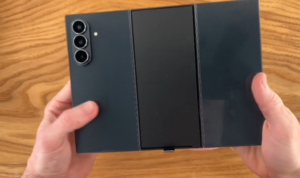
Let’s go ahead and check out the star of the show here, the Galaxy Z tri-fold. Wow, first impressions are just wow. This is crazy that this is a tri-folding device. Let’s go ahead and fold for the first time in the wrong direction. Hinges feel pretty sturdy here on the first folds, first impressions of the tri-fold in the hands. Definitely feeling the chunkiness of it, given the tablet form factor it has.
Comparisons (Fold 6 & 6):
Here is a side-by-side with the fold 7, so similar thicknesses given the actual parts themselves. But with this extra portion added here, we are actually getting some extra battery life on this, but honestly, design-wise pretty similar overall. The cameras look pretty much identical. We have the same camera system in this tri-fold as the Fold 7. People have been comparing it to the Fold 6 in terms of thickness because it’s 12.9 millimeters on the tri-fold and 12.1 millimeters here on the Fold 6. But this definitely still feels chunkier given the larger overall screen size.
Physical tour here on the side, we have the same positioning of the volume rockers and the fingerprint sensor. On the bottom, we have our Type-C port, pretty much the thickness of the phone itself, but what is great this year, we finally have 45 watts super fast charging 2.0. We are so glad that Samsung has finally added its fastest charging speeds to its top-end device.
Physical Tour:
On top, we have a few more mics. We have our other speakers, so a dual speaker setup on this. Looking at the hinge on the right side, overall, it is very slim, so you don’t really feel it all that much. It’s a comfortable feel in the hand. And the larger hinge on the left side actually feels even flatter compared to previous folds, even though the thickness is back a bit.
And then to get to the sim tray you actually have to open up to this portion of the phone so this inner portion we actually have another mic here and then we have our sim tray which inside here looks like we have room for just one sim card perhaps in other regions of the world this could be a dual sim setup but just a single sim card here in the us and there doesn’t appear to be any micro sd expansion here.
Looking at the bottom fully opened up, it is kind of interesting that one portion of the phone is actually a little bit thinner than the others. So we think this one is 3.9 millimeters in thickness, and then these two other portions are 4.2 millimeters, but we guess that for it to just properly fit, each one cannot be the same size.
But overall, the phone still feels very solid when it’s folded up, and also feels solid and sturdy when fully opened up.
Display First Look:

But overall, the phone still feels very solid when it’s folded up, and also feels solid and sturdy when fully opened up. But now here’s our first look at the 10.1-inch inner display. Obviously, the star of the show here is this tri-fold. Just crazy to have this tablet in this form factor that you can just fold up and put right in your pocket. We also have on the outside the 6.5-inch display that we just saw for the first time on the Fold 7.
Been loving this in the new larger outer display and also turning this the other direction too. This is also a really solid feeling form factor here. Whereas on this Fold 7, you don’t really have that experience because it is just a square form factor, so whichever way you have it, it’s pretty much the same.
Weight:
Checking the weight on this tri-fold, yep, coming in at 322 grams, that’s pretty heavy. If we take the Fold 7 here feels much lighter in comparison.
Yeah, 217 grams. We have a Fold 6 here as well. That was a bit heavier, 250 grams. Here’s our Fold 2. That’s coming in at 284 grams. So, really not that far off from a device that had a much smaller outer display, much smaller inner display. We are getting so much more screen real estate here. So overall, the package really does not feel all that bad considering the amount of screen space you’re getting.
As far as any gaps on this phone that looks to be completely flush here with the gaskets between each part of the phone; you can maybe see through a tiny bit there in the folded portion.
Trifold Carbon Case :
First impressions of the case in hand, really nice feel, doesn’t seem to add too much more weight. With the case added, it’s only adding about 30 grams of weight overall for the first time on a Samsung official case; we actually have hinge protection. This is something that they didn’t include in any of their previous Fold cases for whatever reason. This also has a really nice carbon feel to it and has some really nice snap back to it.
It goes right into place, so this is not a loose, flimsy sort of thing here. And speaking from personal experience with the Fold 7, it does actually help to open up the phone a little bit to have a little bit of extra gripping point with the case on it, versus having no case at all. So if you have a back case and a front screen protector, that should be enough to get you by.
There actually is a pre-installed screen protector on this. We just checked it does have a screen protector on there. And there is also a screen protector installed on the inner display.
Biometrics:
And it’s been a couple of days now since we first started using the Galaxy Z tri-fold. Super excited to share some of our first impressions with you guys. Getting into the phone, the biometrics, absolutely love the side-mounted fingerprint sensor. It’s really our favorite way to get into any phone. It just instantly unlocks and is really nice with this more narrow outer display.
Inner Display:
And of course, it also works if you have the phone opened up in tablet mode, go ahead, unlock, get in. There is also face recognition. However, we just have the fingerprint sensor set up since it’s just so quick and instant. And now that we’re in, we’ve got to talk about these displays because this tri-fold is honestly insane. This has been one of the most versatile mobile devices we’ve used.
Anything that has come to mind so far in the last couple of days, we’ve been able to do it and do it enjoyably on this tri-fold. We love how much more use case potential there is with this, considering that using this in portrait orientation is actually super helpful and useful. For example, Samsung Notes here, super nice to reference when looking at it in portrait orientation here.
Reading is excellent overall on this device. Really nice when opening PDFs in emails and things like that. This is just so much better, really, than any other smartphone. We can go ahead and fill this out. And then on the opposite end of the spectrum, short-form content is so good on this larger screen. And then obviously great landscape to go along with it.
Fill up the entire phone, but this is still dramatically larger. So we’ve already watched five hours or so of content on this inner display just over the last couple of days because this is super accessible. You can really enjoy a large screen anywhere you are. And then you still get a really nicely sized video. This is one of our favorite use cases on the past gen folds, being able to have half your screen video.
But now you’re getting a really large video, no matter how you choose to view it. So again, the versatility of this is really unmatched. We have a nicely positioned speaker setup here, dual speakers in the middle of the phone. And why we love this so much is that your hands are never in the way of the speakers.
No matter how you hold this phone, no matter how you’re using it, if you have a controller plugged into it, you are still always having access to those speakers firing out. So even though this is a very thin device, not the most bass on these speakers, they get plenty loud.
Outer Display :
And then even though the inner display is the star of the show of this device, we still have a very good outer display. We’re not gonna talk about it too much, just because we’ve already seen this on the Galaxy Z Fold 7.
But for those who may not be aware, very easy to type on this outer display. We can definitely notice the chunkiness more when we’re on the outer display, just because we’re feeling all the extra amount of heft compared to the Fold 7, which is just so much thinner, so much lighter. It means we’re using this outer display more on the Fold 7, whereas on the Tri-Fold, not that it’s even an issue, but we’re just jumping into that inner display much more often on this. And that is perfectly fine because, between what we’ve shown so far, using it in landscape.
And portrait, we can fit more apps on this home page than we would ever need.
Creases :
Now, as far as the creases, you do notice them if you put this in an awkward lighting angle, and you’re not looking at the phone straight on, but if you’re looking at it straight on, really 80% of the time we arn’t noticing the creases at all we just have a really nice looking display on this great colours good brightness.
You don’t really feel the creases when you’re using the device. It’s just sometimes in certain lighting environments, you will see a little bit of distortion because of the creases. When you compare this to some of the first-gen Folds, it is just a night-and-day difference as far as how well-engineered this feels.
Case First Impressions:
It is just a great feeling in the hand. And we have been using the case with it a lot. Actually, we really do like the case, even though it seems like it doesn’t cover that much. It has given us a lot more grip and confidence on the phone. There are a bit of sharper corners on this tri-fold, so having this case with the hinge protection and this bottom corner protection does actually make the phone feel a lot more comfortable using the outer display in addition to the inner display especially when using it in portrait orientation compared to when you don’t have a case it is actually kind of sharp on the hand. So even though it adds a little bit of bulk and heft.
We’ve been really liking the case a lot. There is definitely a bit of pocket presence with this device. Maybe we’ve just been spoiled by the Fold 7, but when this is in the pocket, it really doesn’t feel like you have a foldable phone with you, which was kind of always the case with previous-gen Folds. So far, we think the trade-off is definitely well worth it. It’s considering the tablet we’re getting with this.
Use Cases :
Spreadsheet work on this is super enjoyable. Able to see so much more than any other device. Multitasking is excellent here. Super smooth performance. You still have two very respectably sized apps when running side by side. You can run up to six or seven windows at once. This was a very enjoyable experience hooking it up to a Bluetooth keyboard. This is the Samsung smart keyboard. But having a nice slim keyboard to go alongside this is a really nice pairing. As we mentioned before, a great reader as well, considering how thin and how lightweight and how large a display you’re getting here. Now gaming on this has also been great.
Gaming :
Now gaming on this has also been great. So start with some old school RuneScape here. They have updated this game a lot to play really well on mobile.
Here we go, level 85 range, just been doing some AFK crabbing here to test out the device. But this runs at a nice, smooth 120Hz refresh rate no matter where you are in the game. And if you’re doing something a little less intensive, you can use this outer display as well, and similar to the past-gen Folds, you can put this somewhere, you can prop up this outer display.
And just leave this somewhere at the side of your desk or something. Definitely going to be playing this a lot on here. Another game we really enjoyed showcasing this form factor is Polytopia. This is just a turn-based strategy game. But what we love about this is that you can play in either orientation. So we can go ahead, pop it up here in a portrait.
Same experience here, nice smooth refresh rate, and if you’re able to pair up a controller with this, it is honestly the ultimate gaming experience. So this is the Gamesir G8 Plus controller. It’s a Bluetooth controller that actually just barely fits the trifold. It extends wide enough that you can fit it inside, and it’s a really good gaming experience here. No matter what we’ve been playing, we’ve been getting very good performance with the Snapdragon 8 Elite processor in this.
You can really do just about anything on this trifold, and also look at some Stardew Valley, just a screen space here. We’ve only been able to do a few hours of gaming, but we’re really excited to do a lot more gaming, and just a lot more productivity and a lot more everything on this trifold.
Cameras :
Taking a look at the cameras, we have the same setup here as we had on the Z Fold 7. So here’s a look at some of the 4K 60 filming. This phone does have a pretty good feel in the hand when you’re out filming.
And on the photo side, a lot of versatility with the 12 megapixel ultra-wide lens. There is a 10 megapixel three times optical lens, so decent zoom on this. Here’s a look at the 10 times past this zoom is really when you start to lose quality, but overall, we would say it’s a pretty good camera system on this trifold.
Battery Life :
Taking a look at the battery life on our first battery cycle, we’re down to eight percent. We were able to get six and a half hours of screen time using 92 percent of the battery; about half of that was watching YouTube on this inner display, in addition to almost two hours of gaming on this inner display at maximum brightness.
And at the end of that first battery cycle, we were able to get nearly seven hours of screen time in our first charge. Now we are almost through our second battery cycle. We’ve been using this phone on maximum brightness all day today. We’re at five and a half hours of screen time with 23% battery remaining.
So we think we’re gonna get close again to the seven hours of screen on time. You’re getting around seven to eight hours of screen time on all those other tablets, so with that in mind, we are very impressed with the battery on this trifold, and then to go with that good battery.
Charging Test :
We also have Samsung’s fastest charging speeds, the 45-watt charging. We are super happy this is here on this trifold. As far as getting this fully topped up, it does take a little over an hour to get it fully charged, but the real benefit with the 45-watt charging is getting a quick top-up in much less time. So in 20 minutes of charging, we’re almost halfway charged up already at 46%. 10 minutes later, at the 30-minute mark, we’re at about 65% charge. And then at around 45 minutes, you’re pretty much going to be mostly charged up.
Final First Impressions :
So overall, first impressions, we think it goes without saying that we absolutely love the Galaxy Z Triforce fold. We’re loving the outer display. This is a great screen for doing some of your basic tasks, and the 10.1-inch inner display. We’ve been able to do so much on this and do it enjoyably, which we honestly can’t say that for the previous folds with the squared off form factor. Sometimes watching content feels a little limited. Having the squared off form factor, we think it just makes it a little less versatile.
After using this tri-fold for a couple of days, we feel like we can do anything on this device. We don’t think that makes this Fold 7 any less obsolete. We think this is still an excellent choice for a lot of people. This is going to come in at around half the price. But when it comes to this tri-fold, it is just a whole other level.
Even though it has a very high price tag, we think people are definitely going to try to get their hands on this. Hopefully, it comes back in stock here. Because we definitely want other people to enjoy this phone. We are definitely going to be continuing to use this since we can do pretty much everything on this tablet now.