Is OPPO Find X9 Pro Better Or Not?
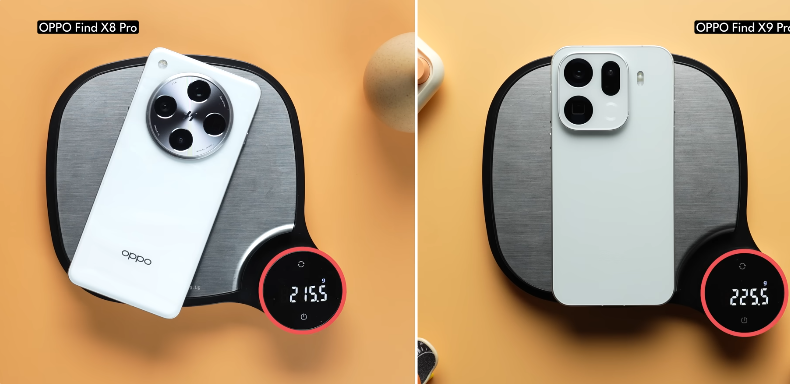
Table of Contents
Introduction:
So this is the new OPPO Find X9 Pro. It takes the already great OPPO Find X8 Pro and makes it way better. We read that the Find X9 Pro has a single periscope camera compared to the dual periscopes that were there last year in the Find X8 Pro. So how is it way better? We know that you have that question in your minds. But trust me, that’s actually. A good move, and we’ll explain why in these detailed impressions of the Find X9 Pro, which has launched globally. That’s when we’ll do the detailed review of the phone. Alright, let’s get down to my first impressions.
Design:
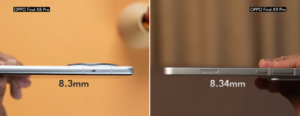
Now it all starts with the design, of course, the Find X9 Pro is thicker and heavier than the Find X8 Pro. Yeah, no kidding, really, it’s actually thicker and heavier, but it’s not necessarily a bad thing. And that’s primarily because the Find X9 Pro actually has a 27% larger battery inside, and it has that new, very large periscope camera as well. And there, the added girth makes a lot of sense. Now, it would have been a problem if the phone were not easy to handle, but that’s not necessarily the case because Oppo has done a fine job by designing or actually redesigning the phone. The new camera deco is the first thing that immediately stands out as a circular unit on the Find X8 Pro.
It’s now a squarish unit at the top left corner which is very reminiscent of the oneplus 13s and we like this design a lot primarily because if you notice very closely the glass at the back blends into the camera module and then there is a little bit of a metal sort of you know railing that gives it a little added rigidity and in totality it’s like a very premium design and oppo’s been doing a very good job designing these you know pro phones although we have to confess that there’s one thing that thing that That irks me, and you know sort of kicks my OCD is the fact that the periscope camera is not symmetrically aligned within the camera ring itself.
Now, regardless of the totality, the in-hand feel is fantastic, the ergonomic is actually very good too, and there’s not too much of a table wobble either.
You know, Oppo has done a really good job here. Plus, the flat metal railing and the flat back, flat front, all of that make this feel a lot like the iPhone, but which Android flagship doesn’t today? So, in-hand feel-wise, actually, really good design, build, fantastic. In fact, you also get, you know, an IP69 rating, plus Corning on the glass with test 2 protection on the front and the back.
Now, apart from the regular slew of ports and buttons like the power button, the volume rocker, the Type-C 3.2 port at the bottom, the SIM card tray, which is a dual nano SIM card tray, and of course the mics, you also have two extra buttons very similar to the iPhone. Now, the first one is called the Snap Key, and by default, it accesses the Mind Space feature, and we’ll talk about that in detail and apart from that you also do have the quick button now this is what the iPhone’s camera control button is but it’s a much much better implementation see a double press from any part of the screen actually opens up the camera app but when you enter the camera app itself a single press of the quick button actually takes a shot a long press takes continuous shots and when you’re holding the phone like this in landscape mode you can also swipe this button to sort of zoom and the latency is so well-tuned that it is leagues better than what Apple has achieved with the iPhone.Oppo really puts the iPhone’s camera control button to shame.
Display:

Now, as for the display, Oppo has replaced that quad curved panel from the Find X8 Pro, and it’s now a completely flat panel. But if you guys have followed my work, you know that we really like flat displays, and this one is a really, really gorgeous one because it has the slimmest bezels on a smartphone yet. Which means that you get fantastic screen estate. Honestly, bezel sizes have become so slim that it’s giving us an inferiority complex now.
As for the rest of the technical specifications of the display, they’re largely similar to Find X8 Pro in that you actually get a 6.78-inch AMOLED panel with LTPO technology, no less, which means that it can refresh from 1 Hz to 120 Hz. And this is also a 10-bit panel, mind you, which means that you get support for HDR10, you get support for Dolby Vision, all of that is still there. Another spec that’s similar on both phones is that you get 2160 Hz of PWM dimming. Having said that, one different spec is that the Find X9 Pro has 3600 nits of peak brightness as opposed to 4500 nits that we got with the Find X8 Pro. But truth be told, we don’t see any difference in daily usage because both these panels can get really bright outdoors, and the color accuracy is on point, especially when you use the natural mode. And more importantly, the HDR gradation is superb, both on YouTube and Netflix.
So much so that when you look at both these displays side by side, they look nearly identical, except for the fact that on the quad curved panel, if light falls on it, you’ll see some reflections around the edges, which is not a problem with the flat display. There is one change with the Find X9 Pro’s display, though; it can go down as low as one nits. Now, when you club that with the 2160Hz of PWM dimming, you can expect flicker-free usage, especially when you’re using this display, this high refresh rate panel in the dark.
The red display of course is fantastic, but so is the haptic feedback tuning, as is the case with most Oppo phones that have launched lately. With O-Haptics, you just get fantastic haptic tuning. That’s not it, you also get the same ultrasonic in-display fingerprint scanner, which is very fast to unlock, very responsive, and you can also use it if your fingers are wet. The stereo speakers sound clean and detailed, if not very loud, they’re pretty good enough. Take a listen to it for yourself.
Their support for LDAC and LHDC, both Oppo, never misses out on those features. So that’s great for anybody who’s an audiophile. So overall, if you look at it, when you look at the display and the multimedia experience, it gets all of the flagship specs, right? Except for one thing, and that is the fact that it doesn’t have an anti-reflective coating on the display, which is also available with the IQOO 15 now because it uses a Samsung panel just like the S25 Ultra.
Performance:
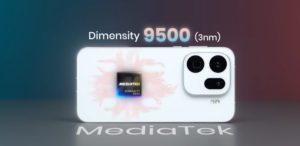
Alright, now time to talk about the performance, and the Find X9 Pro is the first phone that we’re testing that has the MediaTek Dimensity 9500 system on chip. Now this has all the big cores. You get one 4.21 GHz Ultra core, there are three premium cores, and four more performance cores. But truth be told, the absolute beast here within the chip itself is that ARM G1 Ultra GPU.
Well, because it beats the GPU used by the A19 Pro inside the iPhone 17 Pro Max, both in the Steel Nomad Light Test and the Solar Bay Test. Now, we also played Genshin Impact at the highest graphics target, 60 FPS for 30 minutes, and got absolutely zero drops in frame rates. It is a smooth experience end-to-end. We think modern smartphone SoCs can easily handle Genshin Impact now at 60 FPS, and it’s high time that, you know, the makers of Genshin actually support 120 FPS for Android phones.
Now talking about the rest of the benchmarks that we generally run, we got the best Antutu score yet on an Android phone that we’ve tested. Of course, we tested the version 11, so the Antutu scores are matched with the Snapdragon 8 Elite’s version 11 and, you know, the MSI 9400’s version 11 as well. And the storage read-write speeds are pretty good too.
But one area where, you know, the Dimensity 9500 is not matching up to the A19 Pro or the Snapdragon 8 Elite Gen 5 is basically in Geekbench because the single-core and the multi-core scores do not match up. So my takeaway is that the CPU is not that powerful, but the GPU is very, very powerful. However, Oppo’s performance tuning is a very conservative one, so it tends to throttle the performance a lot, which is evident from the 3DMark Wireless Extreme Stress Test that we ran.
Battery:
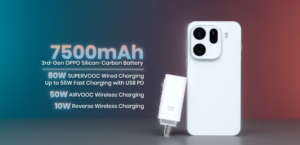
Now talking about the battery, you do get a large 7500 mAh 3rd generation silicon carbon battery inside this phone, and Oppo also offers 80W of SuperVOOC charging along with the charger inside the box. You also get 50W wireless charging support and 10W reverse wireless charging support. Now, to be candid, we haven’t actually done a battery run yet. So we will save my thoughts on the battery performance for the detailed review when that happens. We’re expecting the battery life to be great.
Oppo’s autonomy is generally very, very good. Also, we haven’t tested out the charging speed. So we’ll do that as well. Plus more performance tests for the Dimensity 9500 itself. So yeah, it will help you guys.
Camera:
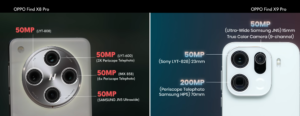
Alright, now time to talk about the cameras on the Find X9 Pro, which is something that you guys were probably waiting for. So yes, the Find X9 Pro has an upgraded primary camera. It’s the Sony LITIA 828 sensor, which is a larger sensor now. So it’s a 1×1.28-inch sensor as opposed to 1×1.4 inch that was there on the Find X8 Pro. You also get a 50MP ultra-wide-angle camera and that new 200 megapixel Samsung and Hasselblad periscope shooter, which tops out at 3x, and of course, the selfie camera has also been upgraded to 50 megapixels now, along with autofocus capabilities.
Now we’re going to be talking about a few changes that we noticed with the camera app and the kind of performance that it’s bringing, but don’t consider this my detailed review because there is some detailed testing still pending, and of course comparisons as well, the first thing that we noticed is that with the camera app now when you shoot high-res samples it adapts actively changes the resolutions depending on the light conditions, the focal length, all of those things.
Which means that it outputs at 26 megapixels, 50 megapixels, or even 12 megapixels, depending on the situation and the need. Initially, we thought that it was an odd implementation and that the control should be in the user’s hands. But when you start using the camera app, you realize that you actually do have control. This is just the way to use the default photo mode. And for most users, it will make a lot of sense because many times your shots will end up looking more detailed than you expected them to.
And like we said, apart from the standard high-res mode, you also have the Hasselblad high-res mode, which now sticks to 50 megapixels by default, or you can shoot at 200 megapixels. And we must tell you this, the 50 megapixel outputs from the Hasselblad high-res shots are so friggin’ detailed. It’s literally insane. In this shot, you can see the cough web in super detail, and in the next shot, if you zoom into the eyes, you can actually see that we’re holding up the camera.
Interestingly, all the 50 megapixel outputs are tagged as 8k ultra HD within the camera app, and here’s another fun fact: if you swipe up from the photo itself, you can see all the details of the shot, similar to what you get on the iPhone.
But fair warning, if you’re going to be using the 50 megapixel Hasselblad high-res mode a lot, note that it will definitely eat up your storage because the output sizes are larger than you know regular 12 megapixel Interestingly, with the 50MP shots, we were expecting Oppo not to do any HDR or multi-stacking for HDR, but that’s not really the case because with the power of the ISP that you get with the MediaTek Dimensity chip and the Lumo camera system that is there, you actually can get HDR out of the 50MP shots as well. In fact, unlike the Google Pixel, you can actually see the live HDR in action within the camera app, which is pretty damn cool.
Having said that, we’d have actually preferred the HDR tuning to be slightly more natural-looking. It sort of boosts the highlights and the colors a tad more than we would have ideally liked them to. Now, talking about modes, the mode that we spent most of our time shooting in is actually the master mode. The skin tone difference alone was enough for us to use it more and more. We mean, it’s a night and day difference if you take a look at it.
The default photo mode and even the Hasselblad high-res mode still offers slightly reddish skin tones as opposed to the more natural skin tone tuning of the master mode but if you do use the master mode consider that as an actual pro mode so you do not get HDR stacking out there by the way the 50 megapixel selfie camera it’s fantastic it takes really good selfies by the way and very detailed ones too and you can also take 50 megapixel selfie shots if want the ultra-miracle camera is also super detailed we like the shots that we got from it and as for that 200 megapixel Hasselblad telephoto well at 3x and 6x the performance is really good you get really detailed shots and even up to 20x we’d say the photos look good but if you look at the long range zoom anything beyond 20x and especially at 60x and beyond it starts using AI and the kind of results that we are seeing from it.
Not that great and we did shoot a bunch of shots with AI and without AI and when you look at the comparison both don’t look as impressive as we expect a 2025 smartphone but then again this is too early for us to judge primarily because there is still some time for you know Oppo to add camera updates and improve the zoom performance even more for long range zoom otherwise.
By the way, the Find X9 Pro is also an excellent portrait shooter because you get fantastic edge detection, the poker drop off looks natural, so much so that you can’t distinguish between the regular 3x shot and the 3x shot with portrait mode on. It’s that good. In fact, we think that it’s one of the best in the industry right now. Now, back to the good stuff, the macro mode, the dedicated macro mode, is insanely good.
The implementation that Oppo has done here, especially with the fact that you can actually have natural blur or full clarity depending on what you want it to be, is pretty nice because these are the kind of macro shots that we got from it, and yeah, the quality is insane. Then there’s also an extra true colour camera that legit helps ensure that the colour accuracy is spot on in landscape shots.
We really wish Oppo could have utilized this specific camera for really good human skin tones as well, because with the default photo mode, like we said, not that great. Now, video recording is possible at 4K 60fps and 4K 120fps using the primary and the telephoto camera. The ultra-wide at the selfie camera stops out at 4K 60fps, which is fine. Now, all the cameras can also shoot Dolby Vision videos, and in the pro video mode, you can now shoot log videos. Here’s the colour-corrected footage of a log video that we shot. By the way, these are my very first impressions of the video recording capabilities, and we must say that it’s positive.
But again, wait for my detailed verdict.
But one very important thing that we noticed with the Find X9 Pro is that the zooming within the camera app is super smooth now. It’s almost iPhone-like. As we said, these are just my initial impressions of the kind of camera app experience that you can get from the phone, and the kind of picture quality that you can get. A detailed review will definitely have a more detailed, you know, verdict on the camera system itself. But in the meantime.
Software:
Now, finally, to talk about the software experience, it’s ColorOS 16 based on Android 16. This is the first phone that we’ve tested with ColorOS 16, and it’s a fantastic experience, but not something that we haven’t seen before. OxygenOS 16, of course.
Now we do have a detailed review of ColorOS 16 and a comparison with OxygenOS 16 to see what is different. So stay tuned for that one, but we will just tell you a few important changes that we noticed and that most Oppo users would love to know. First things first, animation smoothness is top-class. We mean, we just don’t have to say this. It’s the best in the industry. And you also get Flux Themes 2.0 now, which has way more themes, and you can finally add customized text. The full-screen AOD is, of course, new, and the animation smoothness from the AOD to the lock screen to the home screen.
A home screen offers scalable icons and folders. You can also add shortcuts. The quick settings are now more customizable, and they look very good, too. AI features are all bunched into one setting within the settings app itself. Also, AI writer is now integrated system-wide, which means that even if you’re sending a WhatsApp text message, you can actually use AI writer. Then there are a few new AI features, like portrait glow, that have been added.
But the biggest AI upgrade has to be the fact that Gemini has now been integrated within Mindspace itself. Talking about which, with this button, you can actually single press to capture a screen grab for your memories, or you can long press to actually take a voice recording now, or you can double press to open the Mindspace app.
Now, within the Mindspace app, if you have similar kinds of memories, it also bunches them into one category or a list, which is pretty cool. Now the Gemini integration is plain and simple. You can actually ask Gemini to look up Mindspace for specific memories that you’ve created. It’s pretty cool. Talking about certain issues that we have with the software, and this is just OPPO doing OPPO things.
Basically, the lock screen still has that carousel magazine feature. Of course, you can switch it off, but we’re not a big fan of this. Hot apps and hot games are there by default on the home screen. And even if you remove it from the home screen and then restart your phone, it gets added back to the home screen, which is not nice. There are a lot of pre-installed third-party apps, but we feel like most of them are pretty useful. And even if you don’t want them, you can uninstall. So we’re not complaining too much about that.
Now, apart from these issues, it is still one of the go-to OS experiences out there. We would go so far as to say that between ColorOS and OxygenOS 16, these two are possibly the best operating systems for Android out there right now.
Conclusion:
So we’ll keep it simple: the Find X9 Pro is a solid upgrade over the Find X8 Pro. We really like the direction that Oppo has taken with this phone. It has made changes where changes were required. For example, the design is now far more premium, the display has a few extras, for example, the fact that it can go down to one nits, the camera system, especially the camera app, has been improved quite a bit now. The performance is obviously great because of the new chip, and you know you do get a really large battery as well, which we’re expecting to give great autonomy.