Brave Ark Tablet Full Look
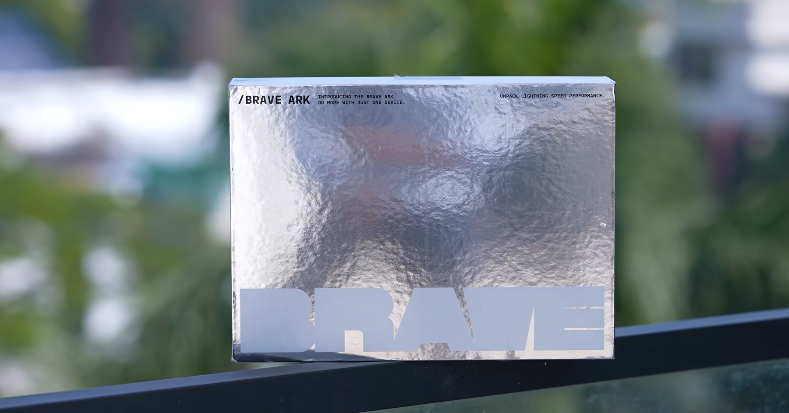
Table of Contents
Introduction:
Okay, so let’s talk about this shiny new tablet box. friends! How’s it going? A lot of people have been asking about this tablet, and it’s just been launched. This is the brand’s first tablet ever. The brand’s name is BV. The octopus logo isn’t on the box, but you’ll see it on the tablet itself. This is the Brev Arc tablet. The box is super shiny, really cool. It kind of feels like when sweets are decorated with silver foil—that kind of vibe. So, let’s find out the full truth about this tablet—what it is, where it stands, and how it performs. This is the first product.
Whatever it is, however it is, some things just make it stand out. Like, it has a good processor — the Snapdragon 8s Zen3. Actually, for a tablet, it comes with the biggest battery, around 14,550 mAh. Just for reference, the Samsung Tab S1 Ultra, which has an even bigger display, comes with an 11,600 mAh battery. And you know what the third highlight is? They even include a pen right in the box. If you’ve heard about it, seen it, or checked the website, you’ll know they really highlight its PC mode.
It’s kind of like a PC experience with an Android tablet because it has a PC mode. Talking about the pricing, it’s mid-range for a single variant and one colour. If you pay an extra, you can get it with a keyboard for mid-range. When they launched it, there was an early offer where the first 200 buyers got a keyboard included as well. Let’s start one by one.
Unboxing:
First, let’s unbox it. So, this is the box. Inside the box is the tablet. You get a Type-C to Type-C cable with the tablet, and the charger is also inside the box. It’s a 33W fast charger. Let us show you the rest of the tablet. The good thing is, they’ve put tempered glass on the tablet before sending it. Usually, with new brands, the product comes without tempered glass, and you can’t find it easily in the market. So if you buy it, where do you get the glass from? That problem is solved here. There are also other things in the box, like a stylus or pen—whatever you want to call it, a smart pen. Now, let’s talk about its features along with what’s inside this box.
You also get a folio-type cover. It’s called a folio cover because it has a stand built in, and the tablet fits right inside it. Plus, they’ve made a spot on top to hold the pen. And here’s the main tablet we have. See, there’s no brand name mentioned anywhere. Octopus is just a silver-coloured logo, which is probably why the box is silver too. You might notice some glue down here because when they took off the sticker, some glue was left behind. We haven’t cleaned it yet, but it’s no big deal—it’ll be fine. It comes with a metal build quality.
This is the tablet. The frame is basically the box itself. The corners are rounded, and the tablet size is 13 inches – exactly 12.95 inches, but yeah, it’s almost a 13-inch tablet. So, if you put an 11-inch iPad Pro next to it, this one looks noticeably bigger. Or if you place it next to the much larger Samsung S1 Ultra tablet, you’ll get an idea of the size – around 13 inches. Also, it only comes in a Wi-Fi variant, so there’s no LTE option, meaning no SIM card support.
You can’t put it on. But yeah, there is one option here. Below the power button, near the volume button, there’s a slot where you can insert an SD card up to 1TB. And right opposite to that, down here, you’ll see pogo pins for attaching a keyboard because we didn’t buy the keyboard. When we ordered, we were probably among the first 200 people, and the keyboard wasn’t included in our box. Also, the USB Type-C port isn’t centered; it’s a bit lower down. But yes, it’s a USB 3.1 Gen 2 port. And one more thing about this tablet is that the weight feels a bit heavier at first because normally you see tablets around 500 grams.
This one is about 735 grams and comes with eight speakers by DTS. Good thing it’s not BTS, right? Otherwise, the Koreans would be all over it. Just send it now. Go, bro, bring it. Actually, the bell from home is ringing. That’s why we’re opening it. Hey Footkoon, look, now it’s tea time. Okay, okay, let’s talk about the tablet. Should we tell you how the speakers actually are? We had one thought. Someone might say it’s a river. Go away. Overall, like the OnePlus tablets, like the OnePlus Pad 2 or 3, this one might feel a bit less than those.
It’s not super loud, but it comes with good loudness. That’s a good thing. It’ll feel loud enough. And there are three mics here. We checked the mic quality. Basically, this is 5 megapixels, just okay. But the audio quality, which we checked earlier, too, sounds good. Basically, it’s fine for calling and stuff. So, you’ll get an idea from this.
Display :
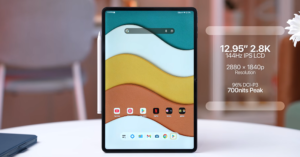
Now, we’re going to talk about this one here, the display. As we said, it’s got almost a 13-inch display. It’s a 144Hz IPS display. But yeah, we’ve seen a lot of phones with 144Hz where it doesn’t really work properly. Here, even at 144Hz, most of the time it doesn’t function fully. So basically, the 120Hz is working fine. It’ll feel smooth, just like a 120Hz display normally does. One thing, though, the resolution is actually a 2.8K display. The colours look good, just like you’d expect from an IPS display. The viewing angles are decent, too. But this display doesn’t feel as sharp as you’d want.
Because it’s 2.8. One reason behind this could be that the pixel density (PPI) is only 264, considering the display size and all. That might be why it doesn’t look as sharp as you’d expect from something that sounds like 2.8. Also, it doesn’t support HDR. Talking about brightness, for a tablet, it’s fine—smartphones tend to be brighter for outdoor use, but for a tablet, the brightness is adequate. Like we said, no HDR support. It has Widevine L1. And another important thing is, there’s no scanner in it.
You won’t get a physical fingerprint scanner. You’ll have to use either a PIN, pattern, or face unlock. And for face unlock, the camera is positioned just right for landscape mode.
Performance and software:
We’ll talk about the camera later, but first, let’s discuss its performance, software, and the pen that comes with it. So, for performance, the processor is solid—it’s the Snapdragon 8s Zen3. The problem is, they haven’t mentioned a lot of details on the official website. Its score is roughly around 1.8 to 1.9 million.
Here it is. And looking at the storage score, it seems like it’s using UFS 3.1, though maybe a bit better than that. And it runs on software—you need to know that this is a tablet. So what’s different? What have they done? It comes with Android 15. As for how many future updates it will get, there’s no clear info on that. We didn’t find any details on the official website, so we’re telling you based on that. And here’s the full software for you to see. Looking at it, it’s clear this is a pretty basic Android skin. The good thing is that there’s no extra bloatware or anything like that.
The basic software you get is pretty much the same as usual. There aren’t many extra customization options here. It feels pretty flat overall. It seems like, considering it’s a tablet, it doesn’t really give you any unique experience. They could’ve definitely added some extras here. Yeah, but they did add one thing—they call it Dock Mode. It’s on the home screen, and when you’re running an app, it hides away, but you can slide up from the bottom to bring it back. This is also where you can multitask.
You’ll get the option to do that. There’s an option to switch apps and use split screen, and if you want, you can even create a shortcut for split screen. Actually, they made a tablet, but don’t have their own notes app. Instead, they’ve pre-installed Microsoft OneNote, which is already a pretty good app. They’ve also included Google Keep. We’ll explain why they included that in a bit.
PC Mode:
Now, let’s talk about what you probably want to know the most. We were most curious about this, too—what exactly they’ve done.
This feature is called PC Mode. You can turn it on right from the notification panel if you want. If there were a keyboard, the option might pop up as soon as you attach it. Once you turn on PC Mode from here, you’ll see a little animation. From here, you can access all the available apps. If you want to lock or quit this PC Mode, there’s an option for that. You can also find settings to change things like connectivity. The taskbar at the bottom shows all the apps you have open. You can open or switch between them right from here.
The app has a minimize button, then a maximize or full-screen button, and a close cross button. There’s also another button that looks like a pin, but clicking it doesn’t do anything. The app’s animation works like this: it slides in from the right side and slides out to the left side. You can open multiple apps at the same time, and yeah, you can resize them a bit too. On the right side corner, there’s a back button, a home button, and a recent apps button that lets you open apps you’ve been using.
You can do it. They’ve provided all the connectivity, Wi-Fi, all that here. So, this PC mode works kind of like this. We noticed one thing here. This tablet’s storage and hardware basically make the processor feel pretty fast, but the PC mode feels jittery. It hasn’t been optimized yet; the software needs some refinement. So, their PC mode is really just basic, nothing extra. They’ve made it very simple. But the PC mode doesn’t give as smooth an experience as the others.
The tablet gives a pretty good experience. So, for those using it for the first time, whatever the reason, the software needs a bit of refinement, more customization options, and it should look a bit more modern. In fact, if you notice, the gesture bar isn’t even centered; it’s slightly off to the side. Whether you’re in landscape or portrait mode, it looks a little off and catches your eye. And if you want to game on it, yeah, the performance is decent. But the thing is, it lacks a gyro sensor.
It’s missing. Not sure why it’s missing at this price. We mean, if someone wants to play BGMI or something, bro, if you’re a Jaro player, it won’t work because Jaro doesn’t have a sensor.
Stylus Pen:
Now, let’s talk about the pen. People are asking from behind, “Stylus? Pen?” Pen, S Pen, smart pen, stylus, whatever you want to call it. We just care about whether it works. As we said, the pen came in the box. Actually, there were two extra tips too. It looks something like this. You can see there are three buttons—one on top and two here.
And also, this has a Type-C charging port. When you press and hold it, it connects. Here, you can customize these buttons. For example, you can set the sleep time or customize what happens when you double or triple-click the up button. The same goes for the down button—you can assign tasks for single, double, triple, or long presses. You can choose from lots of tasks like going to the home screen, opening recent apps, OS assistant, screen recorder, and more. So, you can select whichever option you want.
Sounds good. And at the end, there’s a tail button on the pen. If you press and hold it, it connects, but if you just press it once, you can set what happens. Like taking a screenshot or anything else, you can customize it. Along with that, there are some extra options, like an icon that appears. When you tap it, more options pop up. For example, “Open Canvas” opens Google Keep. They’ve included Microsoft OneNote just by installing it, but it doesn’t open from here—you’ll have to open the app yourself. That’s how the features work.
So, you’ll find whatever is available there. You can take partial screenshots with that. There’s an option called “Right on Screen.” You take a screenshot, and along with that, there’s an option to open notes. The same app will open again in the notes. Oh, they’ve given a good laser pointer too. We thought it would actually hand over the display, but that’s not the case. It just shows a red mark. You’re already touching the display with the pen, which you’ll keep turned off. Besides that, there are customization settings, which we already told you about. Now, we’ll share our experience with it.
Yeah. There are some important options too, like getting palm rejection in it. It’s pressure-sensitive as well. So basically, Microsoft OneNote is a pretty good app for taking notes. If you use a tablet, any brand, it’s free of cost. That’s the best part. So it’s a really good app. You can use the features it offers to create and work. But the experience can be a bit hit and miss. Like, the pen with the UI sometimes works fine, and other times it doesn’t.
It’s not working. Sometimes what happens is, with the pen rejection, it just stops writing with the pen and starts writing with the palm instead. Then the marks show up there. Sometimes the gesture opens up on its own when you click, and sometimes it misses input. The connectivity also has hits and misses. Basically, it doesn’t pair or sync well with the system as it should. This should be better, especially since this pen is a first-party one. We’ve used other tablets where it works much better. So yeah, that’s the situation.
Camera:
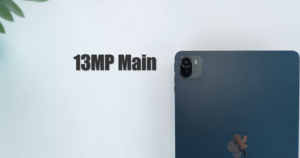
As for the camera, the back one is 13 megapixels. The good thing is that it has a flash, so it can easily take photos of your notes and stuff. If you check out the camera UI and software, just keep in mind it’s pretty basic everywhere. Looking at the camera UI and settings, you’ll get the idea. The camera is decent—not great, but not bad either. On the front, you get a 5-megapixel selfie camera, good enough for video calls and such. As we said, the camera app is basic, so there’s no special document mode or anything like that.
You won’t find a scanner mode or anything like that. But if you open a file manager app like Google Files, you might find that option there, and that usually works anywhere. We’ve already added it. If you use a phone, this mode will be useful for you too. So that was our experience with it. Now, some other important stuff — like how the service center is. We tried calling them, but they just don’t pick up. They keep saying they’ll call back, but never do. So, we went to their website and found an option for service centers. There, you can enter your area’s PIN code.
You won’t find a scanner mode or anything like that. But if you open a file manager app like Google Files, you might find that option there, and that usually works anywhere. We’ve already added it. If you use a phone, this mode will be useful for you too. So that was our experience with it. Now, some other important stuff — like how the service center is. We tried calling them, but they just don’t pick up. They keep saying they’ll call back, but never do. So, we went to their website and found an option for service centers. There, you can enter your area’s PIN code.
You can enter the code and check it out. A PDF gets downloaded, which is basically an Excel sheet. There’s a huge list here with lots of service centers mentioned, including addresses and phone numbers. We called some of them, and they knew about it, while others didn’t. And the process is different with new brands. So, we think that before buying, anyone can just call and check.
Conclusion:
We’ve explained how to do that. In the end, we got two things clear. To sum it up, first of all, we’re brave.
We want to give our opinion to you guys. Straight up, you’re launching a tablet for mid-range for the first time. In our opinion, if you’d experimented around the 20,000 mark, people would’ve been more willing to invest once and then wait to see what the plans are. Now, we’re not saying the company can’t launch an expensive product. When Nothing Phone 1 first came out, it was priced around mid-range, too. But back then, there was a lot of trust in the brand. Multiple videos came out, and there were tons of things going for it. So you just can’t compare this launch with how Nothing started.
So, first of all, this was supposed to launch in December. But it didn’t launch in December. Now, it’s being launched two months later. What happened in between? Why the delay? There’s been no update at all. So, one point could be that, yeah, for the price, the battery is pretty big, and the hardware, like the processor, is justified. But the software feels pretty basic. The experience with the pen needs to be improved. So, when so many things need improvement, before we pay a mid-range price for it, we need to think.
Looks like we have the Xiaomi Pad 7 here. We know it doesn’t come with a stylus in the box. But after buying it, the budget stays pretty much around the same range. It’s definitely better than that. It might sound weird to you, but this is just our opinion based on experience. The OnePlus Pad Go 2 is basically outdated now. It has a Dimensity 7300 processor. So it’s clear that the Brave Arc tablet has a better processor than that. It’s got a bigger battery and a bigger display too. But the software on the OnePlus Pad Go 2, or the way you combine it with the pen.
Looks like we have the Xiaomi Pad 7 here. We know it doesn’t come with a stylus in the box. But after buying it, the budget stays pretty much around the same range. It’s definitely better than that. It might sound weird to you, but this is just our opinion based on experience. The OnePlus Pad Go 2 is basically outdated now. It has a Dimensity 7300 processor. So it’s clear that the Brave Arc tablet has a better processor than that. It’s got a bigger battery and a bigger display too. But the software on the OnePlus Pad Go 2, or the way you combine it with the pen.
You can get it for under a mid-range price. So, the software pen experience will be a bit more refined. The performance isn’t great, but if you’re thinking purely about performance, there’s also the Mipad 7. In fact, the iPad 12th generation is coming out soon. Though we don’t think it’ll be priced under mid-range, you can still consider the iPad 11th generation. Personally, we’d say the biggest plus is the battery on the first try. The processor was good, too. But at the same time, we can’t recommend buying it right now because the overall experience isn’t that great — just a bigger battery and hardware alone won’t cut it.
They still have a lot of hard work ahead. Let’s see if there’s a plan for the second product or not. We’ll think about that later. Hope this answers whatever questions you had.