
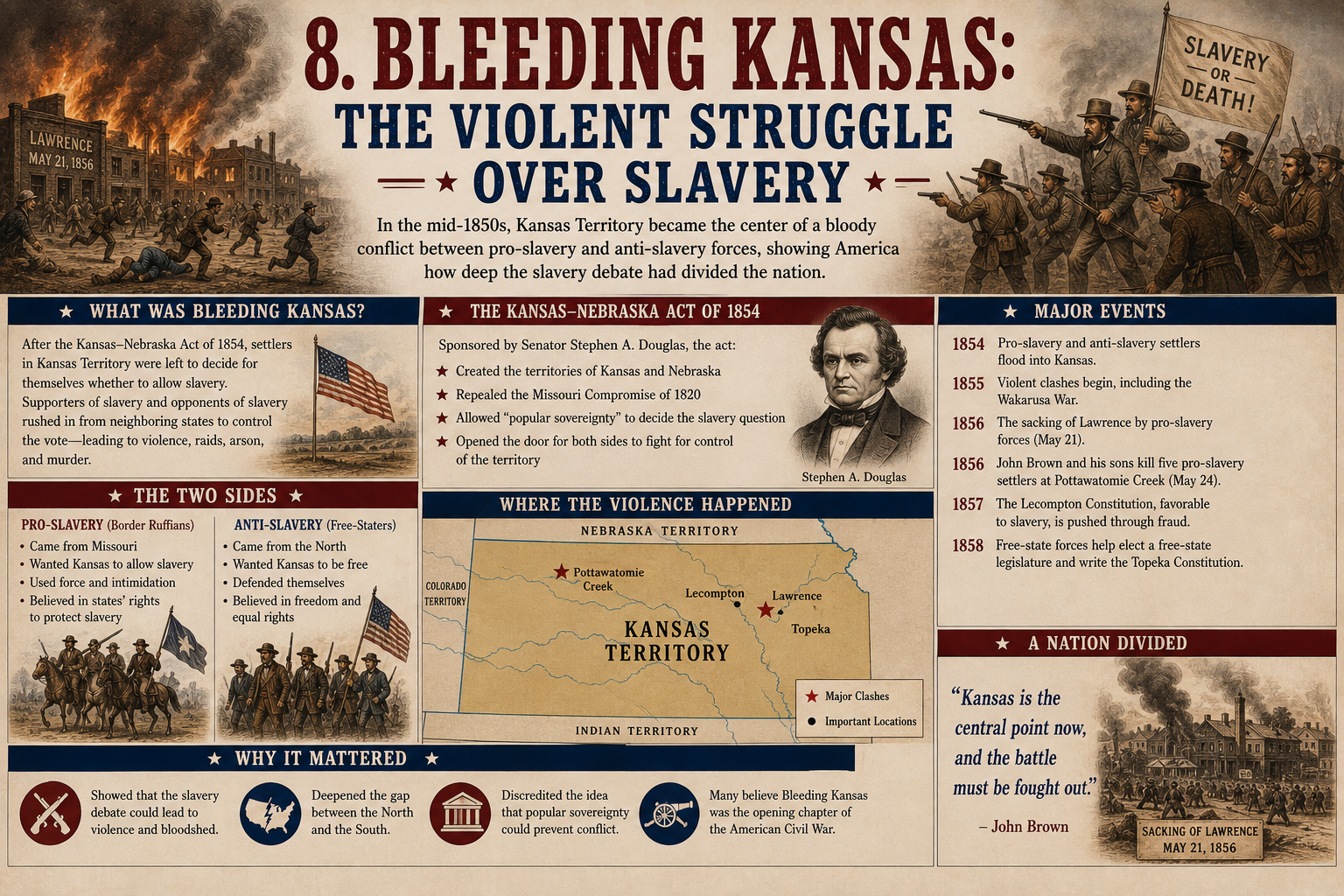
In the years before the American Civil War, few places represented the country’s growing division more clearly than the Kansas Territory. During the 1850s, Kansas became the scene of political conflict, armed violence, disputed elections, and bitter arguments over slavery.
The struggle became known as Bleeding Kansas.
At first, the conflict was supposed to be settled peacefully. The Kansas-Nebraska Act of 1854 allowed settlers in Kansas to decide whether slavery would be legal through a process called popular sovereignty.
Instead of settling the question, however, the law turned Kansas into a battleground between pro-slavery and antislavery forces.
The violence was relatively small compared with the Civil War that followed, but its political importance was enormous. Bleeding Kansas demonstrated that the disagreement over slavery was becoming impossible to contain through normal political compromise.
Why Was Kansas So Important?
Kansas became important because of its location and its future political status.
The United States had been expanding westward, and every new territory raised the same difficult question: Would slavery be allowed there?
The balance between free and slave states mattered greatly in Congress.
If new territories entered as free states, the North could gain greater political influence. If they entered as slave states, Southern leaders could maintain more power.
Kansas was therefore much more than a piece of land on the western frontier.
Its future could affect the political balance of the entire country.
The Kansas-Nebraska Act of 1854
The crisis began largely with the Kansas-Nebraska Act.
The legislation was promoted by Senator Stephen A. Douglas of Illinois.
It created the Kansas and Nebraska territories and allowed settlers to determine whether slavery would be permitted.
This idea was known as popular sovereignty.
Douglas believed that allowing local settlers to make the decision would provide a democratic solution to the slavery question.
However, the law also overturned the practical effect of the Missouri Compromise’s restriction on slavery in the region.
Many Northerners were furious.
They believed the federal government had opened territory that had previously been closed to slavery.
The controversy helped lead to the creation and growth of the Republican Party.
Pro-Slavery and Antislavery Settlers Arrive
After the Kansas-Nebraska Act was passed, people on both sides of the slavery debate began moving into Kansas.
Pro-slavery supporters came from Missouri and other Southern areas.
Antislavery settlers came from Northern states and organizations that wanted Kansas to enter the Union as a free state.
Both groups understood that population could influence the territory’s political future.
The result was a race to establish political control.
The competition quickly became hostile.
The Border Ruffians
Pro-slavery activists from neighboring Missouri became known as Border Ruffians.
Some crossed into Kansas to influence elections and support pro-slavery candidates.
Because Missouri was a slave state located close to Kansas, these activists had a strong interest in the territory’s future.
During elections, groups of armed men sometimes entered Kansas and intimidated voters.
In some cases, nonresidents participated in elections illegally.
These activities contributed to accusations that Kansas’s political institutions were being manipulated.
The Controversial Elections
Kansas held elections to establish its territorial government.
Pro-slavery forces gained control of the first territorial legislature.
Antislavery settlers accused pro-slavery supporters from Missouri of crossing the border to influence the vote.
Many antislavery settlers refused to recognize the resulting government.
Instead, they created their own political institutions.
Kansas effectively had competing governments claiming legitimacy.
This made peaceful political settlement increasingly difficult.
The Topeka Constitution
Antislavery settlers organized a constitutional convention at Topeka in 1855.
They created a constitution that prohibited slavery and established a rival territorial government.
The Topeka government was not recognized by the federal administration.
President Franklin Pierce supported the existing territorial government.
The dispute demonstrated how deeply divided Kansas had become.
Instead of having one accepted political system, the territory had competing groups claiming to represent its people.
Violence Begins
Political disagreements soon became physical violence.
Armed groups attacked settlements and individuals associated with the opposing side.
Buildings were destroyed.
People were threatened, beaten, and sometimes killed.
The conflict became known nationally as Bleeding Kansas.
Newspapers across the country reported the violence.
The events in Kansas became a preview of the much larger conflict that would eventually engulf the United States.
The Sack of Lawrence
One of the most famous incidents occurred in Lawrence, Kansas.
Lawrence was an important center of the antislavery movement.
In May 1856, a pro-slavery group attacked the town.
The attackers destroyed or damaged several buildings, including newspaper offices associated with the antislavery movement.
The incident became known as the Sack of Lawrence.
Although the destruction was limited compared with later Civil War battles, it had a major psychological and political impact.
Many Northerners saw the attack as evidence that pro-slavery forces were using violence to silence political opposition.
John Brown Enters the Conflict
The violence in Kansas also brought John Brown into the national spotlight.
Brown was a committed abolitionist who believed slavery was a moral evil.
After learning about the violence against antislavery settlers, Brown and his sons became involved in the conflict.
In May 1856, Brown and his followers attacked a group of pro-slavery settlers near Pottawatomie Creek.
Five men were killed.
The event became known as the Pottawatomie killings.
Brown’s actions shocked many Americans.
They also demonstrated how quickly the slavery debate had moved from political arguments to armed violence.
Brown would later become even more famous after leading his raid on Harpers Ferry in 1859.
Violence in Congress
The conflict over Kansas even reached the halls of Congress.
In May 1856, Senator Charles Sumner of Massachusetts delivered a harsh speech attacking slavery supporters and specifically criticizing Senator Andrew Butler of South Carolina.
Several days later, Representative Preston Brooks of South Carolina attacked Sumner with a cane inside the Senate chamber.
Sumner was seriously injured and unable to return to the Senate for several years.
The incident shocked many Northerners.
In the South, however, Brooks received praise from some supporters and was sent replacement canes.
The attack became another symbol of the country’s growing political hostility.
If members of Congress could resort to violence against one another, many Americans wondered how long the national political system could continue functioning peacefully.
The Republican Party Gains Strength
Bleeding Kansas helped strengthen the Republican Party.
Republicans argued that slavery should not be allowed to expand into the western territories.
The violence in Kansas gave them a powerful example of what they believed could happen when slavery was allowed to spread.
The party attracted many Northern voters who were increasingly concerned about the influence of slaveholding interests in national politics.
Kansas therefore became an important part of the Republican political message.
The Lecompton Constitution
The conflict continued even after the worst violence had passed.
Pro-slavery leaders developed the Lecompton Constitution, which was designed to establish Kansas as a slave state.
Antislavery settlers strongly opposed it.
President James Buchanan supported the pro-slavery constitution and encouraged Congress to accept it.
However, Stephen Douglas broke with Buchanan and opposed the Lecompton Constitution.
Kansas voters eventually rejected it.
This controversy further divided the Democratic Party between Northern and Southern factions.
That division would become extremely important in the presidential election of 1860.
Was Bleeding Kansas a Civil War?
Bleeding Kansas was not the American Civil War.
The violence was smaller in scale and occurred primarily within the Kansas Territory and surrounding areas.
However, historians often describe it as a kind of preview of the Civil War.
The conflict showed that Americans were increasingly willing to use force to settle the slavery question.
It also revealed that political institutions could break down when opposing groups refused to accept the legitimacy of one another.
Why Bleeding Kansas Mattered
The importance of Bleeding Kansas went beyond the territory itself.
First, it demonstrated that popular sovereignty was not necessarily a peaceful solution to the slavery question.
Second, it increased political tensions between North and South.
Third, it helped strengthen the Republican Party.
Fourth, it contributed to the division of the Democratic Party.
Finally, it helped create national figures such as John Brown whose actions became closely associated with the increasingly violent slavery debate.
Kansas became a symbol of the country’s larger struggle.
From Bleeding Kansas to the Civil War
The violence in Kansas did not directly cause the Civil War.
The country had many other serious conflicts to deal with.
The Dred Scott decision, John Brown’s raid on Harpers Ferry, the election of Abraham Lincoln, and the secession crisis all came later.
But Bleeding Kansas was an important warning.
It showed that the slavery debate was becoming increasingly difficult to solve through compromise.
The political system was under enormous pressure.
Instead of settling disagreements through elections and legislation, Americans were increasingly turning to intimidation and violence.
Final Thoughts
Bleeding Kansas was one of the most important events of the decade before the American Civil War.
The Kansas-Nebraska Act was intended to let settlers decide the future of slavery through popular sovereignty.
Instead, the territory became a battleground between pro-slavery and antislavery forces.
Disputed elections, competing governments, attacks on settlements, the Sack of Lawrence, the Pottawatomie killings, and the violence surrounding political leaders all revealed the seriousness of the conflict.
Kansas demonstrated that the slavery question was no longer simply a debate in Congress.
It had become a struggle that could lead to bloodshed.
The events also helped reshape American politics.
The Republican Party gained strength, the Democratic Party became increasingly divided, and Americans across the country began to recognize that the disagreement over slavery might eventually lead to a much larger conflict.
Within only a few years, that prediction became reality.
Bleeding Kansas was not the Civil War, but it was an important warning of what was coming. The violence in the territory showed that the United States was moving toward a crisis that political compromise alone might no longer be able to solve.
Leave a Reply