iPad Air M3 Review!
Table of Contents
Intro:
We haven’t reviewed an iPad for a long time, and we were getting an iPad Air M3, so we thought, why not? This tablet costs in the high range. And there are a lot of options in Android as well at this budget. We will also talk about why you should buy an iPad. Firstly, there are entry-level iPads with the latest 11th generation with an A-series processor. Then there is the iPad Air series, which we have, and they come with the M-series chipset.
The latest one is M3. Then there is the iPad Pro series, which comes with the latest M5 chipset with a tandem OLED display. And we are starting with this tablet.
Variants:
The variant we have is the 128GB variant. As of today, its pricing is high range. It is not a cheap device, and it has an option of up to 1TB. But for that, you will have to spend a lot of money. And this is a non-5 G device. If you buy a 5G device with a base variant of 128GB, you will have to spend a midrange amount extra. 5G variant costs a high range. And yes, this is an 11-inch tablet. There are also 13-inch variants. But the pricing is a little different.
Build & Design:
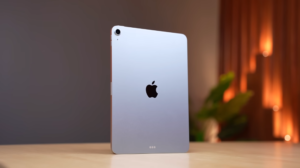
And starting with the design, it has the same design as the iPad Air M2. Apple doesn’t even change the design quickly. Because people like it so much, and Apple says no innovation. We do it very slowly. And on the back, there are pogo pins. You can attach the magic keyboard to it. And it is very cheap. It is a midrange keyboard. In this, you get an Android tablet. And on the top, there are volume rocker buttons. And this area is to attach the Apple Pencil.
And when you attach the Apple Pencil to it, it starts charging wirelessly. On top, there are 2 grills and a power button.
That is the Touch ID, i.e., a fingerprint scanner which works fine. And on the bottom, there are 2 speaker grills.
And a Type-C port, which is USB 3.0. It has a 10Gbps bandwidth with which you can take the display output. In which you can mirror the screen and extend the display. So if you make a full table setup with the accessories, you can get the laptop feeling. Not a magic keyboard, but a cheap keyboard-mouse combo from Logitech will work.
The thickness of this iPad is around 6.1mm. So it is thin. And the in-hand feel is also good. Its weight is around 460g. And even after spending so much money, there is no IP rating. You don’t get such a good IP rating in tablets.
But Apple said that they won’t even give a rating. Along with the keyboard, this tablet also supports Apple Pencil. Both Apple Pencil Type-C and Apple Pencil Pro. We have this Apple Pencil Pro, through which you can charge it wirelessly. And it is not very expensive. Below range only. So if you want to do sketching tasks, note-taking, writing, it has a barrel roll and haptics.
Apple Pencil feels really premium while using. We have used many styluses on Android. But the Apple Pencil is the reason why so many people use an iPad. And the major thing is that we can’t feel the latency. So if you are spending extra money and you need it, you won’t be disappointed.
Audio & Haptics:
Next is audio & haptics. We just showed you that there are 2 grills on both sides. But it doesn’t have a quad speaker. It has a stereo speaker only. The other 2 grills are for acoustics. For better sound quality.
No doubt, the sound quality is good. It feels loud. Stereo separation is also good. But it is very important to have a quad speaker. Because in Android, you get a quad speaker even in a tablet in the below range. But Apple is Apple. You also get Dolby Atmos support. So if you watch Dolby content, you will enjoy it. But still, it feels better in a quad speaker. If you are using an external device, you can feel it.
And no brand thinks that haptics are required in tablets. Even in 5G cellular tablets, there are no haptics. And this is still an iPad. There is no calling in cellular. There is no official calling option. You can do it through WhatsApp. If you buy the 5G one. After spending below the range amount.
Display:
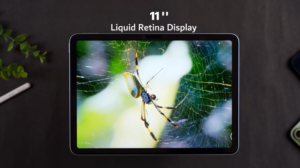
Next is the display. It has 11 inches Liquid Retina Display. Which is an expensive word for Apple. In simple words, it is an IPS display. And its resolution is 2360×1640. And this is a 4:3 display. So you can consider it a little squarish. It’s not exactly square. And it has a 60Hz refresh rate. Even if you give a high range amount. Apple thinks that they will do everything in the Pro series.
Even if you spend a high amount on this. They don’t want to give anything. And Apple lovers will say that 60Hz doesn’t feel like 60Hz. And if we put the flagship Android aside. Like the OnePlus Pad 3. You get a 144Hz display, quad speaker, etc. There are many things. Apple doesn’t mention the protection of the display. So keep it safe. And there is a coating on it.
Like fingerprint-resistant and anti-reflective. But if you apply tempered glass to the tablet. There is no use for the coating. After using the screen guard. And as per the Indian audience. 99.9% people use the screen guard. We are also one of them. Apple mentioned the brightness of 500 nits. We tested it.
It was around 493 nits. And the brightness of 400-500 nits feels less in the tablet. And in this, it definitely feels less. Because they are taking a lot of money. We were using it indoors. It’s good to use it indoors. Look at the multimedia. But when we tested it outdoors. We felt its brightness was less. Like we tested the OnePlus Pad 3 at the same price. It had an all-time brightness of 830 nits.
It was feeling very bright. Then we tested it in the colour gap. 100% sRGB, 99% P3. So the colours are good. Even the HDR performance is good, like we were watching HDR content. Along with Dolby Vision, HDR10, 10+, and HLG. We get all the support here. And the multimedia experience is good here. We watched movies on it. We were watching content on YouTube. The bezels are the same as in tablets.
There are even bezels on all sides. They are neither too thin nor too thick. And the HDR performance is also good. And the speakers are also good. Along with the multimedia. But it has stereo speakers. If you hear them after you hear the quad speakers. We feel that something is missing.
Specifications:
And now, the technical specs. It has Apple M3 Silicon that has an 8-core CPU. It has a 9-core GPU. And it has a 16-core Neural Engine. The whole focus of the M series was on AI performance. But their Apple Intelligence didn’t work properly. They asked Google for help. Because we couldn’t do it.
And there is 8GB RAM and 128GB storage in our variant. You can see the read & write speed. Which is fine. In Sensors & Connectivity, we get Wi-Fi 6E & Bluetooth version 5.3. And in Audio, it supports FLAC codec & Apple’s lossless. This is the same with every Apple device.
Performance & Benchmarks:
Now, let’s talk about the performance. We tested AnTuTu Benchmark. If you compare it with the Apple Air M2. It’s good. We got a 20% jump. But if we look at the Snapdragon 8 Elite Gen 1. Which came in the OnePlus Pad 3. It had a score of 3.2 million. Whereas, this has a score of 2.7 million. Then we compared Geekbench 6.
The iPad Air M3 was performing the best. In multi-core & single-core. Then Geekbench 6’s GPU benchmark. In which we compared it with M2. And the GPU is slightly better in comparison to M2. We can’t add Android here. Because their framework is different. On which the benchmark runs.
So, it doesn’t make sense. Then we tested Geekbench’s AI benchmark. Firstly, on the CPU. Which has a good performance. But when we tested on the GPU. Look at the numbers here. And in Geekbench AI, we kept the neural engine at the back end.
And if you look at the half-precision & quantized score. It’s a huge bump. The numbers are around 30,000. Compared to CPU & GPU. But our single precision score. It performs better on the GPU. Then came the Wild Life Extreme stress test. If we compare it with the Snapdragon 8 Elite Gen 1. In which we kept the OnePlus Pad 3.
It has more stability. And the scores are also high. Compared to the Apple Air M3. So, if you look here, Android has a lot of raw power. But the app supports Android, and the ecosystem is not good.
In that, Apple wins. If we talk about the productivity app. You can take the Creator Studio plan on Apple. Which is free for 3 months. After that, there is a low range amount for subscription. And if you are a student. And you will get low from the below range per month if you are a student. In which you get all the productivity applications. Like Logic Pro for music production. Which you can run on this iPad.
And it gives a very good performance. If you want to run Final Cut Pro. If you want to do multi-layer editing on a tablet. You can run that on it. You can also run DaVinci. It has a good performance. These are native support apps. Other than that, Pixelmator Pro. In which you can design images, videos, vector. If you want to do mock-up designs. You can even connect a secondary monitor.
And by using the keyboard and mouse. You can do all your productivity work. And by adding Procreate. You can do sketching and animation. And M3 is very optimized according to this tablet.
And with this, multi-tasking and side-by-side applications won’t give any problem in that. Here, iPad wins. Specifically, those that come with the M series chipset. Not the 11th-generation entry-level iPad.
Which costs mid-range, not that. What to do about the numbers? There should be good apps. There should be a good ecosystem. And hands down, you will get that in the iPad Air series or above that, the Pro series.
Gaming Performance:
Other than that, in gaming performance. There is no need to talk much. All games run at 60 FPS. Like BGMI, Call of Duty Mobile, etc. And in this, their own AAA titles like Resident Evil and Assassin’s Creed. You can run all of them. And obviously. There are very expensive titles. But yes, it gives a good performance. For performance, you can watch it on YouTube. Someone must have done the game test.
Then comes the OS and user interface. We get iPad OS 26.2.1. And Apple gives long-term OS updates. You can easily get it for 5-6 years. If someone is using it above that, let us know. And it is good to use. We can say it is one of the best user interfaces. According to tablets. It runs smoothly, and it is snappy. Multitasking can be done easily. And according to the use case. You can also use a stage manager.
In which you can open multiple apps in a pop-up window type effect. A stage manager is very useful when you use it with an external screen. It supports multiple gestures. You can shift to apps through 4-screen gestures. You can watch recent apps with a 5-inch device. But we didn’t like the RAM management.
When we open an application and tap on an old app. It doesn’t open from the point where we left it. Sometimes, it refreshes. And the UI is smooth. But it has a 60Hz refresh rate. Once you run a high refresh rate screen. Then 60Hz doesn’t feel good. Apart from that, there is the Apple ecosystem. In which you get a universal clipboard. You can air-drop. You can run an iPad as an extended display. If calls come on your iPhone. You can pick up the call from anywhere.
So all these things are there. And there is Apple intelligence. Like you can get writing features. And you can clean up the photos. We don’t like Apple’s intelligence that much. Because we are a Galaxy user. And we have used Galaxy AI. After that, Apple’s intelligence doesn’t feel good.
They have shaken hands with Google. Let’s see what happens after that. And yes, the major thing. WhatsApp, which was released in May 2025. And the most important. A calculator that is present on the iPad, A lot of people talked about that through reels. Apple gives you the basic things and makes Apple fanboys happy.
Camera:
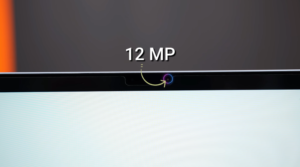
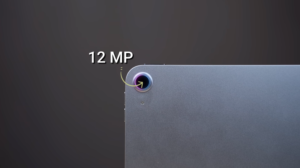
Then coming on to the camera, which is the best among tablets, the iPad. The front camera is 12MP, and it supports the center stage, like auto framing on video calls. Even if it moves a little, it keeps you in the frame. And you can record 1080P at 60FPS through the front camera. Even the back camera is 12MP, but you can record 4K at 60FPS through it. These are the samples of multiple back cameras.
We clicked photos through it. Compared to any other tablet, even if there is a 50K Android tablet, its photos are good. You get natural processing. You can take photos of documents. If you take a normal selfie, the overall photo is good. You can’t use it for photography, but it is good for a tablet. There should be a flash as well. And what is the tradition of not giving flash on tablets? Flash is a must for clicking photos of documents or even studying. Almost every tablet doesn’t have Flash.
And the front camera quality. It gives 1080P 60FPS quality. If you want to take video calls, there are multiple lighting conditions. Here it is warm white. Here it is white. The flicker depends on the lights.
It supports 4K 60FPS. And the quality of the iPad is good compared to other tablets. Mic is also being used on a tablet.
Battery:
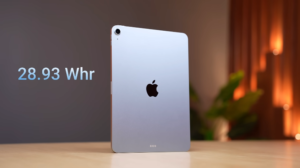
It has a 28.93Wh battery, which is around 7700mAh. The battery size is good.
You get a 10-11 hour screen on time. And it is good for Multimedia, Basic usage, Side-by-side applications, studying, etc. If you use it extensively for gaming, the battery backup can vary. And it supports 20-25W charging. There is a 20W charger in the box.
We didn’t show the unboxing. Because Air M2 has the same charger. The box contents are the same. The cable is also available in the box. And with the in-box charger, it takes 2 hours to charge it fully. This was the complete review of iPad Air M3.
Conclusion:
And let’s conclude now. If you want a tablet for multimedia, study, PDFs, meetings, calls, etc. Then you don’t have to spend so much money. There are a lot of options in Android for mid-range devices. There are a lot of options.
You can do all these tasks in them as well. Talking about this price range, if you want to spend so much money, you should consider a premium experience with a good performance. If you have all the Apple devices like iPhone, Apple Watch, and MacBook.
Then you should definitely go for the iPad according to the ecosystem. And majorly productivity apps. It natively supports video editing, Photo editing, and music production. In those things, no other tablet stands in front of the iPad.
So first understand your usage, then make a buying choice. You don’t have to spend extra money just by looking at it. That was all from the side.