Samsung Galaxy S26 Ultra Full Detailed Look!
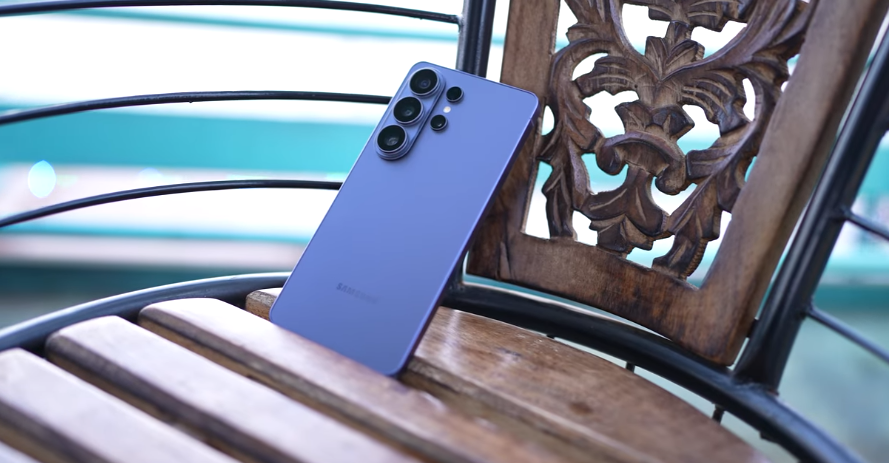
Table of Contents
Intro:

Okay, so we’re going to talk about the Samsung Galaxy S26 Ultra. Hey everyone, so what changes has Samsung made with the Galaxy S26 Ultra this time? And what haven’t they changed? Especially the new privacy display – you’ve probably seen people talking about it online. So, how does it actually work in real life? What’s it like? What differences are there? How’s the display quality feeling so far? We’ll cover all of this in this.
Unboxing:
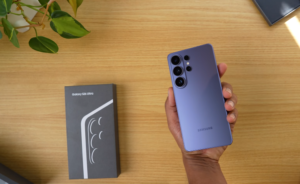
First, the unboxing process: the box looks just like a typical flagship box from them. Obviously, the phone is inside the box. But here, we get the usual Type-C to Type-C cable. There’s no user manual, SIM ejector pin, or charger included in the box. However, this time the S26 Ultra supports faster charging — increased from 45W to 60W. So that’s an upgrade. The battery is the same as before, a 5000mAh battery.
The colour we have here is called Cobalt Violet. Also, we have a silicone magnet case for the S26 Ultra. There’s also a case that looks something like this, and after putting it on the back of the phone, you can attach magnetic accessories. Not directly like the last one. It’s coming in four different colours. You can see for yourself. In fact, the website has two extra exclusive colours every time.
So, there will be two extra colours there as well. And one more thing, the first thing that catches your eye when you see the phone is that the camera layout has changed. Honestly, speaking for ourselves, we prefer the black or the white one.
We like the colour more. We mean, Wish should ask which colour you want before sending the brand review unit—it would feel a bit better that way.
Samsung Galaxy S26 Ultra Physical:
But this colour also looks good. A lot of people will like it for sure. No doubt, this is a new colour. Colour is subjective for everyone. This one also kinda matches the background. So, we’ll tell you six changes you’ll notice first between the S25 Ultra and the S26 Ultra. First, as we said, the camera layout has changed. Second, the S26 Ultra is slimmer than the S25 Ultra. The 25 Ultra is 8.2 mm thick, and the 26 Ultra is 7.9 mm.
Actually, out of all the Ultra phones you’ve seen, their flagship series is the slimmest this time. That’s why it’s being called the Slimmest Ultra. And since it’s slimmer, the weight has also been reduced slightly—from 218 grams to 214 grams. Because it’s slimmer, the camera on the 26 Ultra sticks out a little more. Here are the 25 Ultra and the 26 Ultra. The fourth change is on the side frame of the phone. The button shapes are the same, and everything else looks pretty much the same to you.
But the material was originally titanium. Now it’s aluminium. And the fifth change you saw was from the S24 Ultra to the S25 Ultra—where they rounded the corners a bit. In the S26 Ultra, those corners have been rounded even more. The next change you’ll notice is with the S Pen. If we talk about the S Pen in the S25 Ultra, it stayed pretty much the same—you could attach it in any position without worrying much. But in the S26 Ultra, if you pull the S Pen out and put it back in upside down, the corners of the pen become visible.
The phone has a more rounded design, especially the 26 Ultra, and even the S Pen has been rounded on one side because the phone itself is more rounded. Since the S Pen stays in the same position, they had to round it to fit the design. Also, the S Pen is a bit thinner now; they’ve slimmed it down. One thing that can be confusing at first is how to insert the S Pen properly. But we noticed that if you place the button on the S Pen facing upwards toward the display side, you can easily insert it without much thought.
When you put it on, it sticks right away. So, there’s no confusion about where you placed it. And all the S Pen features you got on the S25 Ultra will be available on the S26 Ultra too. Bluetooth was removed last time, so it won’t be there this time either. Besides that, it had an IP68 rating before, and you’ll get the same IP68 rating here as well. The back is glass with a matte finish, and it still has the same 6.9-inch display size. Also, yes, with the Galaxy S26 Ultra, for the first time in any phone—they even called it the world’s first—there’s a privacy display.
Samsung Galaxy S26 Ultra Privacy Display:
Now, what exactly is that? Let us explain it to you. When you turn this on, you get two options. One is the privacy display, and then you can also turn on the maximum privacy display. Think of it like levels—like level one and level two. With maximum, you can’t see anything from the side at all. So it works really well. There’s no tempered glass or anything—it’s just the normal screen. What they’ve done is basically combined hardware and software right in the display itself.
When you look at the phone’s display, the pixels are the lights that come out and are evenly distributed. You can see them from the front and also from the sides. So, how do we stop that? If we do something so that the pixel lights only come straight ahead, the ones on the sides won’t be visible. As soon as we turn it on, the narrow pixels start working here. It’s visible only to the person right in front and stops showing on the sides. When we turn this on, the display gets a bit dimmer too. So, somewhere the normal display brightness quality gets slightly downgraded.
You’ll see it happening. If you pay attention, you can actually feel the difference. So, a lot of people won’t keep it permanently on. But what they’ve done is pretty smart—they’ve given this option in the software for many users. Here, you get an option, like if there’s a specific app you don’t want anyone else to peek into, like a chatting app or maybe a banking app, you can just turn it on for that app. As soon as you open that app, it switches on, and once you exit, it turns off automatically.
So, for the rest of the phone, like when you’re watching videos or anywhere else, it stays off. It won’t stay on all the time. Or, there’s also an option where, when you enter a PIN, pattern, or OTP, only a specific part of the phone’s display will act like a privacy shield—so people on the side won’t see that part, but the rest of the screen will still be visible from the side. It’s not like you have to keep it permanently on if you just want to hide a little bit. If you feel like a specific app or password mostly needs this, then you can turn it on at that time. Personally, we don’t keep it on all the time either.
We’ll use either app-specific or pin-specific settings. Basically, a pin-specific area. Actually, if you want to turn it on instantly, you don’t have to do it from the notification panel. You can even set it to double-press the power button. So whenever you want, just double-press the power button and the privacy display will turn on. And if you double-press again right there, it’ll turn off. So, depending on what you need, you can instantly decide whether to turn it on or not. One more thing we checked—remember Samsung introduced this with the S24 Ultra—anti.
They had a reflection display. It was there on the S25 Ultra, too. But now, with the 26 Ultra, the entire display has changed. How’s the anti-reflection? It still has anti-reflection inside. We kept a regular phone next to it that doesn’t have any anti-reflection. But compared to the S25 Ultra, it cuts down reflections more. So that’s the difference here. Also, we already told you about the privacy display, which you won’t get on the S25 Ultra, but it’s added on the 26 Ultra. The next question that comes to mind is about the display quality this time.
There have been some changes. First, it got a privacy display. We explained how that works there. Normally, what changes are there in the display? Like when we play videos on both. If we tilt the S26 Ultra more, you can definitely see a bluish tint. Or in videos with a lot of blue colour, the blue vibrancy is more noticeable. Otherwise, the colours, details, and overall video-watching experience are good.
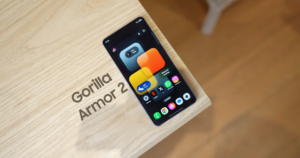
The 25 Ultra was already good, and the 26 Ultra is also pretty great. In fact, even the video quality is no joke. They’re using a scaler. This will work on a QHD display to make things look a bit sharper. As for the display, it’s the same size here—6.9 inches, QHD+ with 120Hz LTPO Dynamic AMOLED 2X, and 2600 nits brightness. So, it’s pretty bright, just like before. The LTPO display switches between 1Hz and 120Hz, and the ultrasonic fingerprint scanner is the same as before.
Samsung Galaxy S26 Ultra Display:
Now, we’re going to talk about performance, and every year, they use the same processor for performance. It’s upgraded too, so it’s running the latest Snapdragon processor—the Snapdragon 8 Gen 2 for Galaxy—with LPDDR5X RAM and UFS 4 storage. The Antutu score is around 3.8 million. Plus, it comes with Android 16 and One UI 8.5, the latest stuff, with long-term software updates guaranteed. Since it’s the new One UI 8.5, we noticed some extra features. So if you already have an older flagship, you’ll get these updates too.
Samsung Galaxy S26 Ultra Performance and Software:
We found some of the changes pretty interesting. There are more changes as well. First up is the home. You can enable a finder option on the screen. Just tap there to search, since we usually keep notifications enabled when we swipe. Also, the search icon in the app drawer has been made more minimal. In fact, the notification panel’s customisation options have changed—you now have more ways to resize and shape it.
One more thing: screen recording was already available before and still is, but now you can do partial screen recordings too, recording only the area you want. We realised while we were calling that the way the new screen display shows up during calls has changed. And another thing, earlier we couldn’t really edit photos. Like if you wanted to generate or edit an AI photo, you’d have to keep editing step by step repeatedly. But here, it keeps creating a history, so you can keep editing over and over like that.
And since this is Samsung’s foldable phone, all the Galaxy features we used to get are available here too, obviously. Yeah, we noticed some new ones as well.
Photo assist. Now you can make changes to photos just by giving some text commands. And it does a really good job. The Creative Studio is here. You get multiple options here. You can generate a photo by uploading your own picture, or you can give some text commands to create different types of photos in various styles. Whether you want to make a profile picture or share it, you can do that. In fact, you can even create by drawing. Next, there’s a “Now” or “Now & Next” option here. It could be really useful, especially for people who need lots of reminders. Events are saved in the calendar.
Like, we saved that on March 8th at 3:00 PM. We have a cricket match, and then we get a message. If we want to arrange a meeting on the same date, it starts suggesting on its own, like, “Hey, you have a cricket match at this time,” so you can schedule your meeting accordingly. It gently reminds you—smartly implemented. Also, call assist was there before, with a call screening option. Like, if someone calls us, then we can. By tapping on the screen, the AI first creates an OS and asks the person on the other end.
It supports multiple languages, and we selected Hindi. The person on the other side will hear, “Hey, bro, who did you call and for what purpose?” You’ll get their response, and it’ll show us the reply as text. We can then decide whether to pick up the call or not. Also, there’s a new audio eraser option—like if you’ve recorded a video, you can erase parts of the audio. This feature was available in third-party apps too, like on YouTube.
We’re watching the video, and let’s say there’s some noise in it—that noise will be reduced to some extent. Now, talking about the camera, look, the S25 Ultra and S26 Ultra have the same megapixels, but compared to the S25 Ultra, the main camera on the S26 Ultra has a bigger aperture. It used to be f/1.7, now it’s f/1.4. The 5x telephoto lens aperture has also been improved from f/3.4 to f/2.9.
Samsung Galaxy S26 Ultra Camera:
So, from this, you can guess where it’ll perform best—that’s in daylight since there’s plenty of light. In low-light conditions, having an f/1.4 aperture means better performance. It needs to be F1.7. So first, we’ll show you a low-light photo taken at night where there’s artificial light, low light, or night photography, as Samsung calls it. Comparing the S25 Ultra with the S26 Ultra, yeah, the light sensor on the S26 Ultra captures more light, so the photos come out brighter.
It’s also managing the details well. Look at this photo—the S2C Ultra has captured much better light in the shadow areas. In fact, when we clicked a photo, we noticed the text was sharper on the S2C Ultra. Now you can see the full menu. Read through it all. Go ahead and order from the menu. Here, with the S26 Ultra, if you look at the lighting, it’s controlling things better. Talking about conditions, like in daylight, it’s not always the case that the S26 Ultra takes better photos.
Sometimes, the S25 Ultra actually clicks better shots. Sometimes they’re the same. And sometimes the S26 Ultra picks up better details. Yeah, it really shines when it comes to handling dynamic range and shadow parts. Like, take a look inside the shop.
You can see this window, right? The shadow part has more detail. Or look at this photo—you can see it’s handling the shadow part better, with much better control. If we show you some different photos from the Galaxy S26 Ultra and the 26 Ultra, yeah, you can see multiple photos here. No doubt, you can take better photos with this. And along with that, on the S26 Ultra, you can also get the maximum.
You can record videos in 8K at 30fps. You can also record 4K videos at 60fps with all lenses and switch between them. You can record 4K videos at 120fps. You can record 4K portrait videos too. This feature was there before and still is. So, what’s new? The new thing added is the horizontal lock. What the horizontal lock does is, even if you fully rotate your phone, the video won’t rotate.
The horizontal lock stays fixed in the video. This works with the ultra-wide and main camera. We’ve actually seen this feature before, but most people used to record videos in Full HD Plus. The quality was compromised a bit there. There’s no 4K option here, but it’s better than Full HD. You do get the option up to QHD. The second change Samsung added for the first time in the camera is that in videos, we now get an option for APV codec mode.
We’ve enabled it, and this video is being shot right now on the S26 Ultra. So now what we’ll do is apply an LUT on it. We’ll do some colour grading since they’ve provided different LUTs. So, as we start applying them.
Yeah, this is Standard Mode. It applies automatically, so you don’t really need to do much colour grading. Then there’s Blockbuster Mode. Here, you get a separate colour LUT and a theme along with the colour. The third one is Coming of Age. This one’s pretty popular on Instagram. Next up is one called Romance, and after that, Thriller. So, you get different LUTs like this. That’s basically it.
Personally, we liked the Coming of Age filter the best. But it really depends on the vibe you’re going for. The details and stuff in it are pretty good. Here it is now. The size will just be bigger. This is a 1-minute 11-second-long video. And if we check the size here, with 4K quality, it’s 6.78GB. Next, there’s auto framing, which uses a 4K 30 fps ultra-wide-angle camera. So it keeps auto-framing based on where the subject is moving in front of it. Now, we’re not sure if this feature will come to the 25 Ultra through a software update or not. We hope we’ve explained a lot. Anything else to say about connectivity? We mean, it’s a flagship phone. You’ll get all the options.
The USB generation will be faster. And yeah, one more thing—the battery is still 5000 mAh. Charging speed has been increased from 45W to 60W. Similarly, wireless charging was 15W before, but now it supports 25W wireless charging. So all these features come with the Samsung Galaxy S26 Ultra this time. What about the pricing? It will come in three variants. Starting with 12GB RAM and 256GB storage. This time, there’s also an option of up to 16GB RAM with 1TB storage. The price starts at a low range, whereas last time it was around the low range.
Samsung Galaxy S26 Ultra Price:
Here, you can get the 512GB variant at the price of the 256GB one. This comes with pre-booking, and we’ll share more details about that here. So, you get all this with the S26 Ultra this time. We hope we’ve covered everything—what’s changed, what’s stayed the same, how the battery performs, and the other stuff. We’ll also try to do a long-term review after using it for a while. The main highlight, though, is its privacy features. Display. It depends on how much you’re going to use it.
But yeah, what they’ve done here is pretty well executed—the combination of hardware and software is solid. Personally, we liked the feature that you don’t have to keep the display permanently on; you can turn it on instead of the password or pin, or even just for specific apps. We’ve seen a lot of people in the streets and on roads and stuff walking around with screen protectors like that, and they actually ruin the display. The quality gets really bad. But here, everything is integrated perfectly. The rest is up to you.