The RTX 5050 Best Laptop
Table of Contents
Introduction :
The most-awaited gaming laptop is here. Lenovo’s lock. We have always tried to cover as many variants as possible. What can we do? This time it’s a little late, but we have finally got the 50 series. So the first 50 series lock. Let’s see what new features Lenovo has added this time.
Let us tell you about a good experiment that we are doing these days.
So, we’ll tell you the result of the experiment we did.
Unboxing :
So, we’ll change the box from the front. Everything inside is the same.
We are not unboxing it because we have already unboxed it. We will show you the power adapter and a laptop. We have a power cable like this. It is the same 3-pin power cable as the laptop. You will also get a 3-pin port from here. And here is our power adapter. This time it is quite big. It feels heavy to lift. Earlier its adapter used to be a little slim. Power is also increased. Then we get a 245W adapter. And the pin is the same as it always comes in Lenovo.
Design :
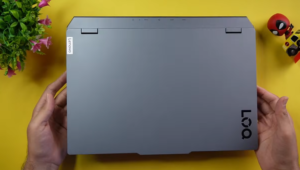
It looks like the previous one; we don’t get much change in it. You can see that the top lid is exactly like the previous one. There is branding of the lock in the corner and the same metallic gray color laptop comes in front and back from everywhere. But this laptop is not made of metal; it comes in a polycarbonate build. On the back side, we get exhaust vents, and ports are also given to us.
But the left side is plain and we don’t get anything there and you can see the back side, there are some exhaust vents and honeycomb design but it is closed from the middle and open from two places and also open from here we get the rubber grip fully and there are two small rubber grips here and Lenovo says that we give this rubber grip fully so that the cool air inside it remains cool.
The hot air through the exhaust vents should not go to the lower side of the air intake. Because if the hot air goes, the laptop will get hotter. So that’s why they have given a full rubber grip in all their gaming laptops. See how much R&D brands do. We got to know, so we thought we would share it with you. As the thermal is going on, in your lock, you will get the same cold front hyper chamber as in the Legion. Through which, what will come inside?
It tries to cool down the CPU and GPU by circulating cool air. But yes, you get to see very good results in terms of thermals. Rest, we will tell you in the testing, how its performance is in the 50 series.
Build Quality & Weight :
It is the same as the previous one. So you will get a similar type of build. Not much difference is found in it. Like if you want to open it with one hand. Then it is done easily. There is no problem with weight distribution. We like the quality of this hinge. As such, there is no problem. It is long-lasting. You can use it well. Apart from this, wobbling is slightly available in this laptop. But it is not so much that you have a problem with it. And talking about flex.
The flex in the polycarbonate build is the same as we get. Not much. Overall, the quality they have used is good. We mean, there will be no issue. Keyboard flex also does not seem too much. It is normal. And yes, the display is maximum 180 degrees. It is completely straight. See. Isn’t it a good thing?
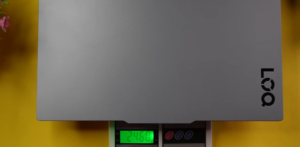
Rest, let’s see its weight once. First, it was 2.3-2.4 kgs. So, let’s see how much it weighs. Is there any change in the weight? No, it’s the same weight. It’s a 2.4 kgs laptop. Now, in this variant, there is a little heavy charger. So, if we weigh it with the charger, then its weight is around 3.1 kgs. So, now the gaming laptop will give you the full feel. Lock is no more. It’s a thin laptop. By the way, it wasn’t that much before.
Now let’s come to our ports. As before, we don’t get any port on the left side of a similar type. It is a smooth highway as always. We will drive the car on this. There are no potholes. There are some potholes on the right side.
Ports :
Now let’s come to our ports. As before, we don’t get any port on the left side of a similar type. It is a smooth highway as always. We will drive the car on this. There are no potholes. There are some potholes on the right side.
On the right side, we have a USB Type-A 3.2 Gen 1 port, a headphone/mic jack combo, a camera privacy shutter, and a Type-C 3.2 Gen 2 port. In this port, we have DP 1.4 support.
It supports up to 140 watts. If you connect a PD charger of 140 watts, it will charge. Although we don’t have such a big charger. If someone is very rich. And it will also give a file transfer speed of up to 10Gbps. There are more now. There is one more at the back.
USB Type-A 3.2 Gen 1 port, this is 5Gbps. One HDMI 2.1 port. Through this, you can get a display up to 8K 60Hz with HDMI and one RJ45 LAN port, one more USB Type-A 3.2 Gen 1 port, and one power input port. Now we get only one Type-C port in it, and through this, also, if you want to get a display output, then you can get it through the iGPU. And the brand has mentioned that you can do up to 5K resolution, but DP 1.4 says that you can do up to 8K.
We didn’t check because we don’t have an 8K display, and we don’t have a 5K display. We checked it in 4K, and we showed you that. The HDMI output comes from the dedicated graphics card. Keep this in mind. It will give good performance if you play games.
Interior :
Now, look at the beauty inside it. It looks so good. Finally, we are getting to see an RGB keyboard inside the lock. In our variant, we get a single-zone RGB keyboard, and you can adjust its RGB in the Legion space software. We will show you now. It is the same keyboard, True Strike, which gives a Legion feel, which is expensive. It is tactile; if you do typing work, there will be no problem, and it will be fun to write.
The keys are fully swappable. You have to buy a separate Lenovo kit to remove the keys and customize your keyboard. This is only given by Lenovo, and we haven’t seen it in any gaming laptop. It comes in Predator too, but it is a bit expensive. You get this feature in the budget in the lock. This is also available in the cheapest lock. The size of the trackpad is also decent. It is fun to use. It is fully touchable.
The clicks are good, the sound is good, and there is no problem in using it. Gestures and other things are supported. And on the right side, we get some stickers. Lenovo has branding, too. And on the keyboard, we get a lot of shortcuts for functions. Apart from this, look here.
Instead of O, it has been made into a logo of a person. We saw this small change, and we told you. That’s it, we don’t have to put anything else. What should we tell you? It is very similar to the previous one.
Lenovo Software :
This is the software of Lenovo Vantage. All the things will be shown in it about your laptop. If you come to the settings, then here you can change all settings related to power. Here are the display-related settings. It also has a super-resolution feature. If you come to Sound, you can adjust all the sound features like speaker noise cancellation, etc. And if you come to input, you can do this thing here. We also get widgets, so you can disable or enable them.
And here are the device details. Apart from this, here you can see how many features are available, which you can adjust at different places and different things, so that we get the performance thing here, Lenovo smart performance, and here you can change the performance according to you, like tune up.
You can say that they have changed the Vantage a lot. It is not the same as before. And you get a software called Legion Space. You can see how it is. Here, the performance of the CPU and GPU is absolutely good. And from here, you can tweak the performance and all that. Quiet balance and performance, and even a custom mode is available in it. It is the same as before. If you want to change it according to you, then do it. From here, we can control the brightness of the keyboard.
It has given a lot of brightness levels, and look how good the animation is here. Here you can choose different effects, breathing, and this audio one is also given. It is also good that if you play something, then it will work accordingly. You get this horse effect; there is also an always-on effect, and you can turn it off from here, and if you want, you can also add.
How many keys do you have to select? Half of them are selected. The right one is not working; it is working only up to this much. You can add a new lighting zone, change some things, add effects, adjust the speed, and you can also change the colour. If you go to random colour or customize, you can add any colour according to you. They have given a lot of great customization in the Lenovo Loke this time. This feature is worth spending on. If you have to spend money, then you have to spend money on an RGB keyboard.
You must be a gamer; gamers must be understanding. Rest, there are game stores and a library. These are the stores that our brother has kept connected to. And here you get Game Clip Master in it. It will capture the highlights of your game, etc. Rest, we get the GPU working mode at the bottom. Here is our max switch. So here we get Hybrid, DGPU, IGPU, and Hybrid Auto. So, as always, we have also got this in the MUX switch Lenovo lock, which is the best thing we think that does not come in any laptop, no matter how much it competes.
AI Features :
And talking about AI features, all the basic AI features are found in it, like Co-Pilot, which has come in every laptop to date. You will also get the option to generate subtitles, translate videos, etc. You also get a copilot in the Paint app, which allows you to remove the background and do different things. If you want to do any AI-related work on your laptop, then its GPU is very powerful. It will handle all the work. You get 50-50.
It is not a problem related to AI; the GPU is very powerful, and it will do all the work. The Lenovo team has put their own LA1 chip in it, which is an AI chip from Keen, that will regulate your performance. If you need more performance anywhere, the laptop will manage it on its own.
Display :
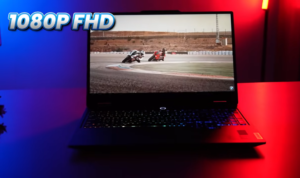
Now let’s talk about the display. We get the same display as before; it is 100% sRGB. 1080p FHD display. The resolution could have been increased a little, according to me. We get a little good brightness in this. It is 300 nits of brightness, which is more than enough for indoor use. It may be a little less for outdoor use if you use it in bright sunlight. But otherwise, there is no problem. But we don’t get HDR support. But if you want to work with colour accuracy, colour grading, etc., you can do all that in this without any problem.
Overall display is good, we didn’t find any problem. But the resolution could have been improved a little bit. Because we have an i7 5050.
Webcam :
Now let’s talk about the webcam. Its webcam is 1440p 30fps. And we liked this thing the most because first, it is 720p, which they have improved now. Now look at the quality. Something like this, its webcam is definitely great in quality. We mean, the lighting is also capturing very well. And you can also hear the mic quality. How is its mic? They did a good job by giving 1440p. And you see for yourself, in this price range, almost no laptop comes with a webcam above 1080p. So this is also a good thing according to the price point.
Speakers :
Now let’s hear the voice of its speakers. We expected that they would be the same as before. Loudness is good, and there is no distortion. Overall, you can say that the speakers will give you a good experience. But yes, there is no bass bass, and it is absolutely good. It is not useless. It is good on average. But it is not very extraordinary. So you will be fine. You will not face any problem. If you will use it while listening to songs, then it is fine.
Battery :
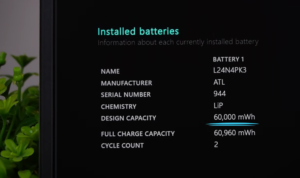
The battery capacity is 64 hours, and it is not a bad number for a laptop, but it can be less, according to a gaming laptop. The backup will be the same as in the previous Loke. If you use it in the IGPU mode, then you get better performance. We used it as much as we used it. Reduce the brightness, reduce the refresh rate, turn off the keyboard backlit, enable battery saver, and use it in IGPU mode.
It will take 2-3 hours to back up. It can vary; it will depend on usage. But don’t expect more than that because gaming laptops don’t get that much backup because it gives more performance and less battery.
Specifications :
Now comes the specifications. You can also see the read and write speed of the SSD. The SSD is upgradeable. Two slots are available in it. One slot is occupied, which has a 1 TB SSD. If you want to do it in the future, you can do it in the second slot. And it can be done up to 2 TB per slot.
But Lenovo has officially mentioned up to 1TB, but some people have upgraded it to 2TB last time, so we hope this will happen too. Talking about RAM, we get two slots for RAM, and currently, one slot is occupied with 16GB RAM. If you want to upgrade to 32GB RAM, then do it. 16GB and 16GB will be 2 RAM, which is good again. It is DDR5 RAM. And talking about the processor, it is very powerful. It is a 14th-gen HX series, so you can do any level of work.
We will tell you more about performance in the section. The graphics card is also very powerful. It has 8GB RAM and 100W TGP. We recently reviewed two laptops with 5050, Victus, and Nitro. Both had the same graphics card, but 75W and 80W TGP. So, in comparison to both, it is better in terms of power.
Performance :
Now comes the performance. So, for that, we did some benchmark tests. For CPU, we did Cinebench R23, Cinebench R24, Geekbench 6, Crossmark, and Blender CPU benchmark. And for graphics, we did the 3DMark Time Spy test and the VRMark test. You can also see the score of Geekbench 6 OpenCL score. It is very close to 90,000.
You can also check the GPU benchmark. It has given good scores as it should have. And if we talk practically, then you can do any good work related to students. Like coding, programming, and some high-level things like running Android Studio, running some heavy simulations, and machine learning. It can handle everything. The CPU is extraordinarily powerful according to programming. Even you will get the GPU with you. And if you are taking it for office purposes, like running Microsoft Office, making presentations, etc.
If you want to do productivity like editing, then you can do photo editing in Photoshop without any problem. Even 3D editing can be done in Photoshop. It is not very powerful, but it will be good. If you want to do video editing, then you can do it in Premiere Pro. 4 K-level video editing can be done easily. Multi-layer 4K editing will be good. If you want to run high-level projects, then you can do it.
If you want to integrate graphics, then we will tell you that medium level will be possible because it is a little graphic-intensive, and the 50 series is a beginner graphics card, so it will not be very heavy-level work. It can be done up to a medium level, but if you want more heavy level, then a PC build is recommended, or you can go for a little more heavy graphic card.
You can do 3D modelling, AutoCAD, Fusion 360, architecture, or game development. Same thing, beginner to medium level, but with more extraordinary performance. Then you have to buy a heavier laptop or PC. So, check your use case.
Game test :
So come, let’s show you the game test. Come on. First, we tested CS2 on a very high preset, and you can see that the FPS here is very good. Our FPS has touched up to 150, 160, 180. The GPU’s TGP has reached up to 75W maximum in this game, and the temperature is maintained at around 80 degrees. So, the overall performance is good; there is no problem.
Then we tested GTA V, and we set the maximum ray tracing, and you can see side by side how much FPS boosts up when the frame generation is set to 2x. Literally, 2x is enough for frames, and you can see the 4x frame generation result too. It easily increases the FPS to 30-40. So, 4x frame generation is doing a good job in GTA V.
This is the enhanced version, so that’s why we get this support. The maximum TGP of the GPU is 95W. That’s impressive. It can draw 100W of power. We tested the RDR2. The favor quality was ultra preset. The FPS is good. It was around 70W. The maximum TGP of the GPU is 85W.
The temperature was maintained at 80 degrees, and we have tested all the settings in performance mode. We have not set the fan speed to full yet. If you set it to full, the temperature drop can be more in custom mode. Then we tested Velodent on high preset. We tested MSAA 4X and an anisotropic filter.
The filtering was on 8x, so be careful. So, there are a lot of settings on the high preset, and we have 300-340 FPS here. This will also help you to guess the power of the CPU. So, the CPU is quite powerful; there will be no problem. If you reduce the MSA and the anisotropic filtering that we showed you in the beginning, then the FPS can be boosted more, depending on the result you want in the graphics. But the laptop will take eSports gaming next level, there is no doubt in that.
Then we tested Hogwarts Legacy on the Ultra preset, and you can see the difference in DLSS frame generation. 2x FPS definitely increases a lot, almost doubles, and if you enjoy 4x frame generation, then you can reach around 200 FPS. The rest of the GPU and DGP consume more than 90 watts, and we saw that the maximum was also happening up to 90 watts. The temperature was a little high in this game.
But again, if you increase the fan speed, it will be managed. Then we tested the Assassin’s Creed Shadows on the ultra-high preset, and the ray tracing is also on high in this ultra-high preset. So, the FPS is good according to that. It’s coming around 30. And when we turn on the frame generation, the FPS reaches around 50-55. And the temperatures are maintained around 80 degrees in this game. So, it’s almost similar to the stats that are seen in other games.
Then we tested Black Myth Wukong on the cinematic preset. You can see the NERO performance, and side by side, you can see the DLSS frame generation performance after doing 2x. The rest, the GPU’s TGP is good, it has gone up to 95W, 98W, 100W in this game, so it sucked it all in, and the temperatures were almost 80 degrees, the same thing as we have seen in the games before.
4x frame generation can reach up to 100 FPS if you play Black Mid Wukong. We checked the ray tracing, and it was not working due to driver issues. Similarly, we tested Cyberpunk on the Ultra preset, and you can see the raw performance and DLSS frame generation on 2x.
We didn’t find much difference in the results. Apart from this, we couldn’t test the 4x frame generation or ray tracing because there was an error in Cyberpunk, which caused the game to crash again and again. This is also a driver issue. We are facing many driver issues in the 50 series. If these things get fixed later, maybe there will be fewer problems. But we couldn’t show it in this case.
But no need to worry, we have tested Ray tracing in a heavy game. In LNV2, we can see how the raw performance comes. It was a high preset. It has given a good FPS of around 40, which is good. And our GPU is consuming TGP of 95W. And you can see the DLSS frame generation side by side. It is running on 2x. We are getting a lot of performance. It is getting a good FPS of around 90. And after 4x frame generation, our FPS was around 150-140. Smooth.
Then, if we turn on ray tracing, it ends up with 10-15 FPS, and if we turn on 2x frame generation, then it becomes around 40 FPS. Now, there is no benefit of multi-frame generation in ray tracing. It will just smooth out your gameplay, but it will make you feel that it is AI-generated and not a fake FPS. So, we will say that ray tracing is not recommended on high preset. It is not according to 50-50, but it is different if you go for 50-60 or 50-70.
4x frame generation with ray tracing will make the FPS reach 70, but it will make you feel that it is not realistic. We will say that you should ignore ray tracing in high preset in such heavy games. If you are going for 50/50, but if you are still interested in playing, then you can play with multi-frame generation.
Conclusion :
So, if we compare it with the last generation Lenovo laptop, which was our first one last year. In comparison, Lenovo has made a lot of improvements. Like they changed their software, they changed the Vantage, they gave a new software for Legion Space, and they introduced RGB in the keyboard. It used to come before, but now they have given some good customizations. They upgraded the webcam, and overall, the tweaks and tuning they have done are good. There is no degradation anywhere.
And talking about upgrading, if you have already bought an existing lock, then you don’t need to upgrade it until and unless you want to upgrade it CPU-GPU-wise. Same thing if you are using a laptop from another brand, then we will say the same thing for them. But if you want to buy a new laptop, then look at your priority because a lock is which offers 100% sRGB and MUX switch at every price point, which is not offered in any other laptop like Victus, Nitro, or even TUF, and if we compare it with the competition, then the 5050 laptop.
In comparison, this is much better because the smaller variant of this i5 13450HX, and the price of the display, the mark switch, and the features it gives, these things are not available in both laptops.
Bye-bye. Stay healthy, stay safe.